
AI in Practice
Holo4 Multi-Interface Agents: When to Use GUI, Code, MCP, or API
H Company says Holo4 can work across graphical interfaces, code, MCP and APIs. The practical question is where each action belongs, what evidence proves completion, and when a person should take over.
On this page
- What H Company announced, and what it does not establish
- Choose the interface for the job, not the demo
- Use an API when the operation is explicit and the endpoint is reliable
- Use MCP when named tools need a consistent connection
- Use code for deterministic work inside a controlled boundary
- Use the GUI when visible state is part of the work
- A bounded example: prepare a customer handoff
- Define completion before you run the pilot
- Keep evidence separate from the benchmark headline
- Give each interface a permission and recovery plan
- A practical rollout sequence
- The decision to make
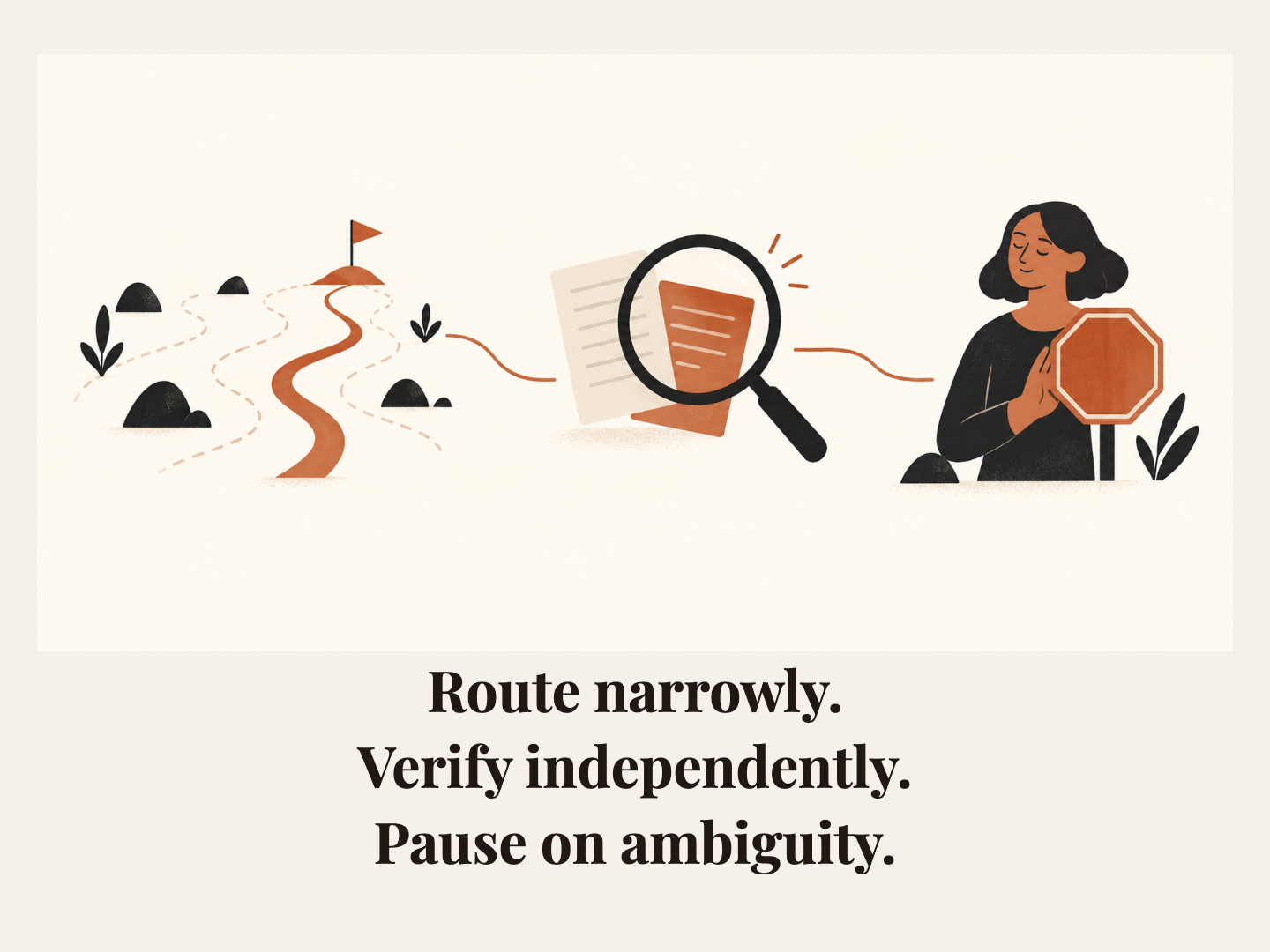
H Company says the same Holo4 model can work through graphical interfaces, code, MCP tools and business APIs. That does not mean every task should be handed to one agent and left to improvise. For a real workflow, choose the narrowest interface that can perform the step, define what a correct result looks like before the model acts, and keep ambiguous or consequential decisions reviewable by a person.
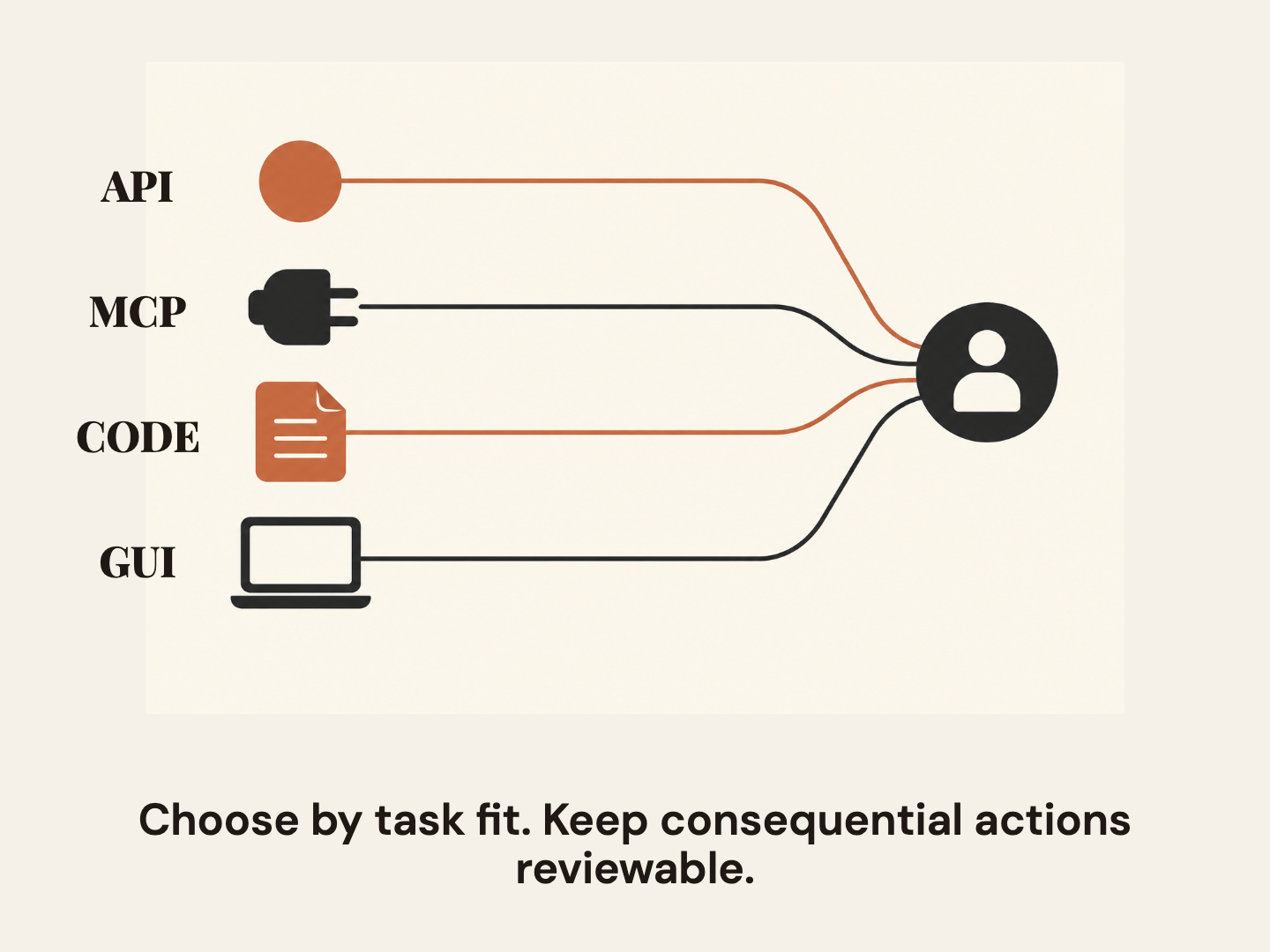
That rule is useful whether you are evaluating Holo4 or designing around another agent. A graphical interface may be necessary when the only available control is on screen. A stable API is usually easier to constrain and inspect when it exposes the exact operation you need. Code can transform data predictably inside a bounded sandbox. MCP can make named tools available through a consistent connection, but the tool still needs appropriate permissions and a clear contract. Crossing interfaces is a capability. Deciding where each boundary sits, and what proves a handoff worked, is still your system's job.
The practical answer: route each step to the smallest reliable surface, verify the resulting state independently, and pause when the task exceeds its approved scope.
What H Company announced, and what it does not establish
H Company announced Holo4 on September 28, 2026. Its newsroom describes two open-weight variants, Holo4-27B and Holo4-35B-A3B, and presents Holo4 as a model that can act across desktop, web, Android, a code sandbox, MCP tools and business APIs. H says the same model can be called through those surfaces. The announcement and the H team’s Hugging Face post are both first-party accounts of the launch, not independent evaluations of the system.
That distinction matters. “Can use an interface” is not the same as “can safely complete any workflow in that interface.” A model does not choose your access policy, define the system of record, supply missing credentials, or decide whether the business consequence of an action is acceptable. A browser click can look successful while a record remains unsaved. A successful API response can still contain the wrong record. Code can run without producing the intended transformation. A tool can be called with valid syntax and an invalid purpose. Your workflow owns those decisions.
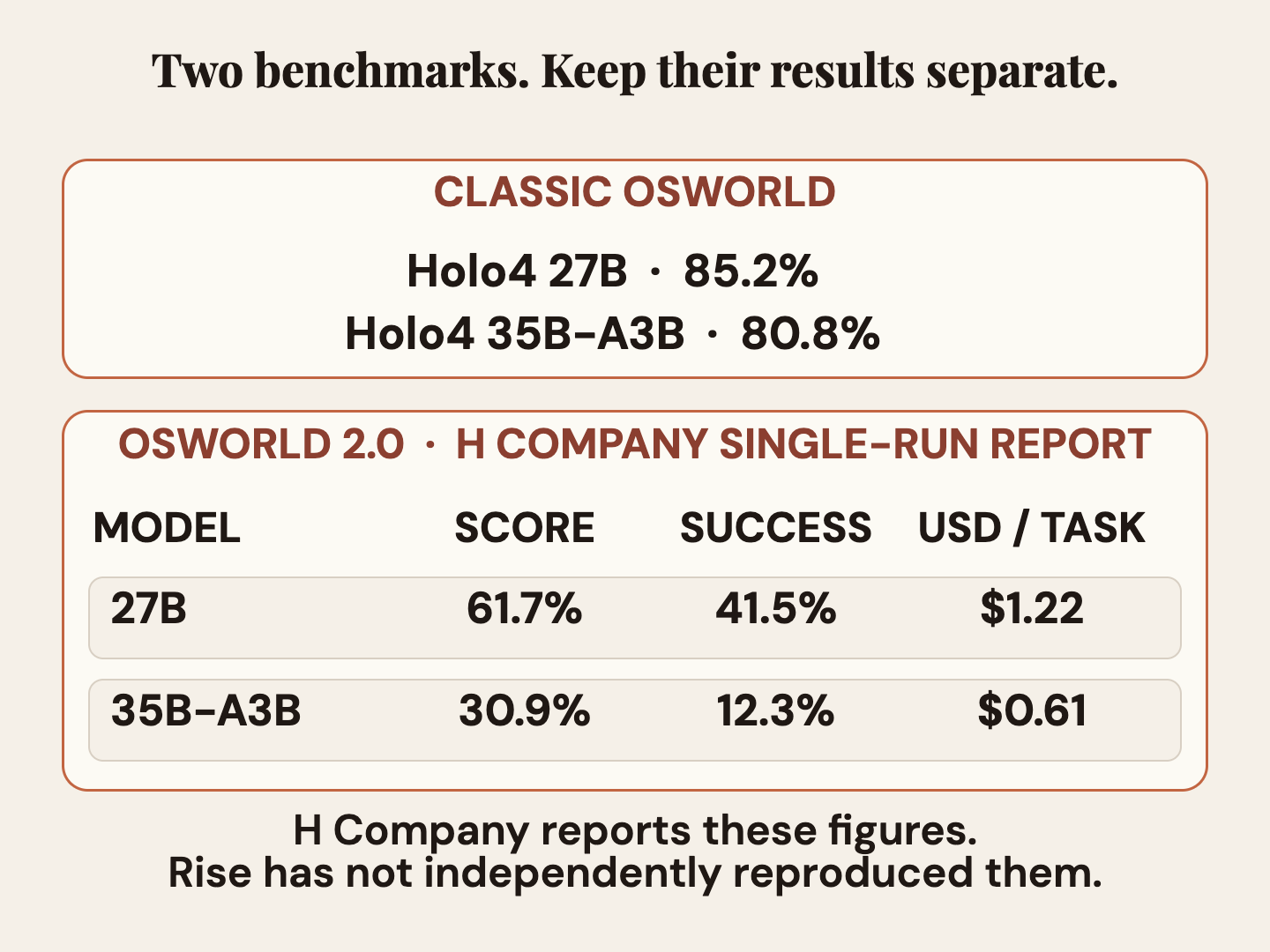
H reports results on several benchmarks, and they are not interchangeable. Its newsroom results list classic OSWorld results of 85.2% for Holo4-27B and 80.8% for Holo4-35B-A3B. It separately reports OSWorld 2.0 figures: 61.7% score, 41.5% success and $1.22 per task for 27B; 30.9% score, 12.3% success and $0.61 per task for 35B-A3B. H notes that these OSWorld 2.0 results are from a single run. These numbers describe H Company’s reported benchmark runs; they are not Rise tests.
Do not read the classic OSWorld percentages as the same measurement as OSWorld 2.0. They are different benchmark versions, and H reports them in separate rows. Within the OSWorld 2.0 row, score and success are also separate metrics. A partial-credit score can indicate progress without proving the task ended in the required state. The dollar figures are H’s reported task estimates under its benchmark conditions, not a quote for your application or a general cost-per-success guarantee. Token use, retries, tools, latency, human review and the rate card in effect all affect a real workflow’s cost.
An independent OSWorld 2.0 paper describes why longer computer tasks are difficult: they can require many interactions, preserve constraints across steps and reveal state that is not visible in a single screenshot. The paper is methodological context, not an evaluation of Holo4. The AutomationBench maintainers distinguish the public task set from a separate private leaderboard set. H Company has also disclosed overlap between its training-data collection and public tasks, then reported a held-out subset. The exact counts and task conditions appear below beside the maintainers’ benchmark description. These conditions frame the vendor report, but do not make it an independent test.
 View image detail
The useful conclusion is modest: H is presenting a model family built to act through several kinds of interface, and its benchmark results suggest a reason to evaluate the variants on your own bounded work. The launch alone does not answer which interface you should use, what the end-to-end reliability will be, or whether the lower reported task estimate corresponds to a cheaper successful workflow for you.
Choose the interface for the job, not the demo
Start with the operation, not with the model’s most impressive mode. Write one sentence that describes the state change you want. “Update the customer record after checking the signed agreement” is clearer than “handle this account.” Then identify the authoritative data, the accepted inputs, the allowed side effects and the evidence that will count as completion. Only after that choose a route.
If you are weighing a visible interface against a structured route, see the related Rise analysis of when computer use is better than an API. It provides the broader interface decision only; it does not verify any Holo4 claim.
Use an API when the operation is explicit and the endpoint is reliable
A well-defined API is often the most direct route for a structured operation: read a record by stable identifier, create a ticket with required fields, or update a status that the business system exposes. The application can validate parameters, restrict the available methods, associate the operation with the correct user, and capture the response. A narrow endpoint gives you a useful contract: these inputs mean this operation, and this response reports what the system accepted.
That contract is a starting point, not proof by itself. Check the resulting state through an independent read, especially for high-value or hard-to-reverse changes. A success code may mean a request was accepted, not that the correct customer record now contains the intended value. A retry can create duplicates if the operation is not idempotent. Prefer stable identifiers, idempotency keys where supported, explicit allowlists, and a post-action lookup. Do not give an agent a general-purpose credential when a scoped service or user permission can do the job.
An API is a poor fit if the endpoint is missing, undocumented, unstable, or cannot express the decision the task requires. It is not automatically the answer simply because a developer can find an endpoint. Respect the system owner’s integration policy, terms and security boundaries. When the needed interface is an approved screen and no supported endpoint exists, GUI automation may be more appropriate, provided you can constrain it and verify the visible result.
Use MCP when named tools need a consistent connection
MCP can expose selected tools and resources through a common protocol. In practice, the important design choice is not the acronym; it is which tools are present and what each is allowed to do. A tool named search_customer is easier to reason about than an unrestricted shell that can reach every system. A tool that creates a draft is different from one that sends it. A read-only lookup is different from a destructive update.
Treat each MCP tool as a permission boundary. Document what it reads or changes, which identity it uses, what arguments are valid, whether calls can be retried, and what it returns as evidence. Keep read and write tools separate where possible. If a task needs to send, delete, buy, publish, grant access, or alter a record that is hard to recover, require a human confirmation or a second authorization check that is enforced outside the model. The interface can make tools discoverable; it does not make every discovered action appropriate.
After a tool call, inspect both the returned evidence and the actual system state. Record a durable identifier for the changed object. If the tool only says “done,” but provides no record ID or follow-up read, you have weak evidence. The next step should be a query that confirms the expected state, not another model-generated sentence repeating the tool response.
Use code for deterministic work inside a controlled boundary
Code is a strong fit for transformations with clear rules: normalizing a CSV, checking required fields, calculating a subtotal, or mapping one known schema to another. It can make the same operation repeatable and testable. Put it in a sandbox with only the files, libraries, and network access the task needs. Validate the input shape, handle missing and unexpected values explicitly, and write output to a known location.
Do not mistake executable code for a verified result. A script may complete and still use the wrong column, omit a row, or overwrite a file. Define small fixtures with expected outputs, compare totals before and after, and retain a diff or validation report. If the agent can write code, review the changes and run tests under a boundary that prevents unrelated file access. Avoid combining code generation, production credentials and irreversible effects in one unreviewed step.
Code also should not become a loophole around a system’s intended controls. If a workflow requires a human to approve a policy decision, moving the same action into a generated script does not remove that requirement. Use automation to make the preparation more reliable, not to silently relocate accountability.
Use the GUI when visible state is part of the work
A GUI is appropriate when the system exposes no approved structured integration, when the state that matters is visible only in the application, or when a human workflow itself depends on reviewing the page. It can also be the right route for small, bounded actions in an existing tool where direct API use would be unsupported. A visible interface gives the agent a view of what a person sees, but screens can change, modals can obscure context, and the same button can mean different things depending on where the workflow is.
A safe GUI task needs a known starting page, a clear target, a limited set of screens, and a stopping rule. Identify the exact account or record before acting. Capture or inspect the result after a state-changing action. If the expected control is missing, the page differs, the target is ambiguous, or the session shows another user’s data, stop and ask for direction. A model’s confidence that it clicked correctly is not a verification signal.
Be especially cautious with actions that submit, publish, send, pay, delete, or alter permissions. Put those actions behind a separate confirmation step or route them to a human. Do not let a broad instruction such as “finish the onboarding” authorize whatever side effects an agent infers along the way.
 View image detail
A bounded example: prepare a customer handoff
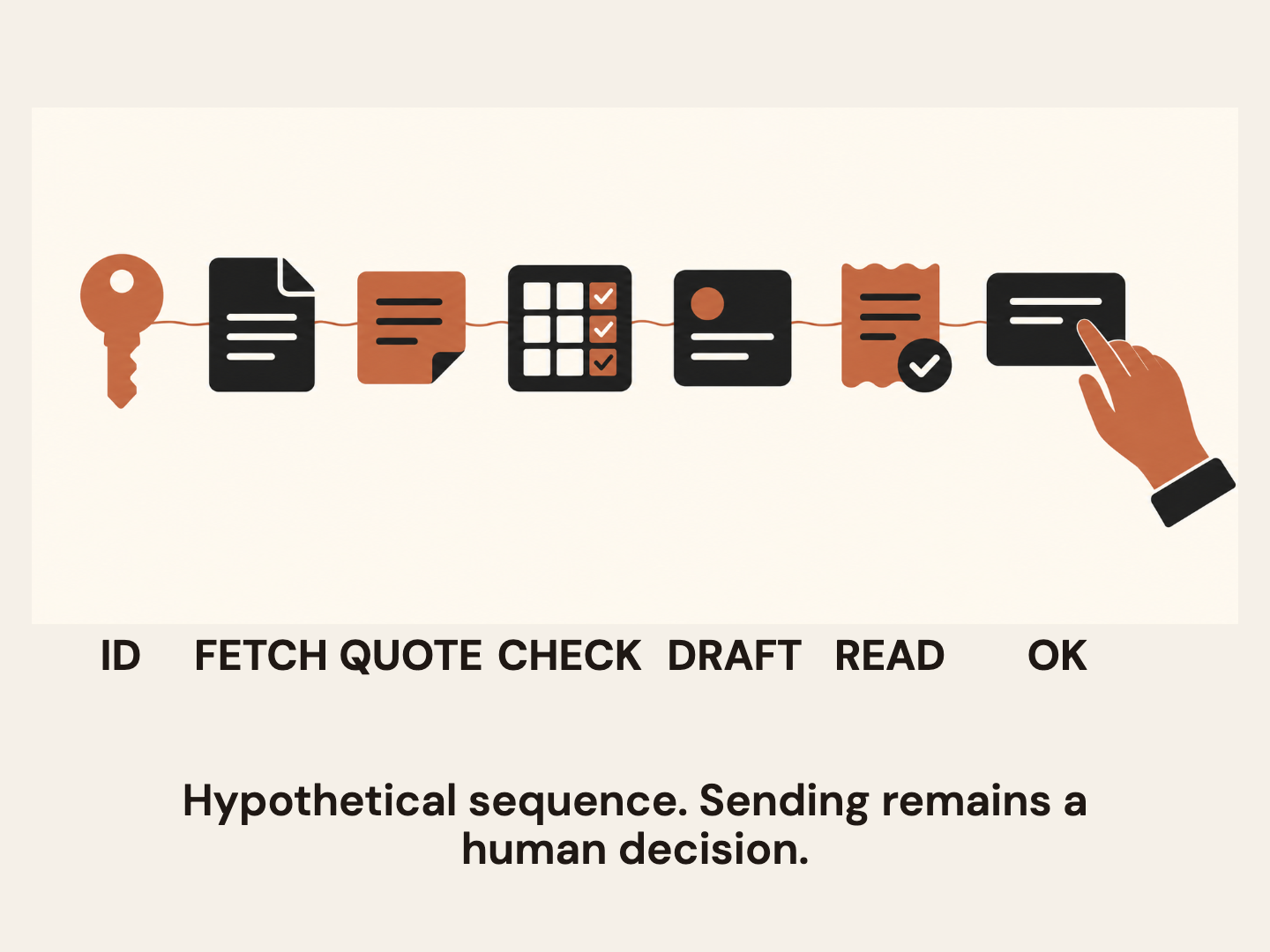
Imagine a hypothetical operations task: prepare a handoff for a customer whose agreement has just been signed. This is an illustrative design exercise, not a claim that Holo4 has performed the workflow or that Rise tested it. The desired outcome is a complete draft handoff attached to the correct customer record, with a person approving any external message.
First, resolve the customer using a stable identifier from the signed agreement. A read-only API or an approved MCP lookup can fetch the matching account and agreement metadata. The workflow checks that exactly one record matches, the agreement date is present, and the account is not marked closed. If no record matches or two do, it stops. The model should not guess which account is “probably right.”
Second, extract the agreed scope from the document. This may require a document reader or an approved GUI if the agreement is only available within a contract system. The workflow preserves citations or page references for the fields it extracts. A code step can validate that required fields exist and that dates use the expected format. It should not invent a missing renewal date or convert ambiguous prose into a binding commitment without review.
Third, assemble a draft handoff. Code can format a schema-checked record containing the customer identifier, signed date, agreed scope, open questions and source references. A named MCP tool can create a draft note in the task system. Alternatively, an explicit API endpoint may be the best route if it exposes that draft operation. The route depends on the approved integration, not on the assumption that every task should touch every interface.
Fourth, verify the created record. Read it back from the system of record by its returned ID. Compare the customer identifier, key fields and source links against the validated input. Confirm that the handoff is still a draft and that no external message was sent. If the read-back differs, preserve the evidence and stop. Do not ask the model to “fix it until it looks right” with open-ended permissions.
Finally, a person reviews the draft and decides whether to send the customer-facing message. The person can see the underlying agreement, the extracted values and the proposed handoff. If approved, the send operation is a separate action with its own confirmation and receipt. If rejected, the reason becomes a new input for the next draft. This division makes the agent useful without pretending it owns the customer relationship.
 View image detail
Notice what the design does not do. It does not ask one model call to understand every policy, access every application, alter the CRM, draft a message and send it. It turns one broad goal into checkable operations. Each operation has an input, a boundary and a completion test. The agent may use more than one interface, but the route is chosen per step.
Define completion before you run the pilot
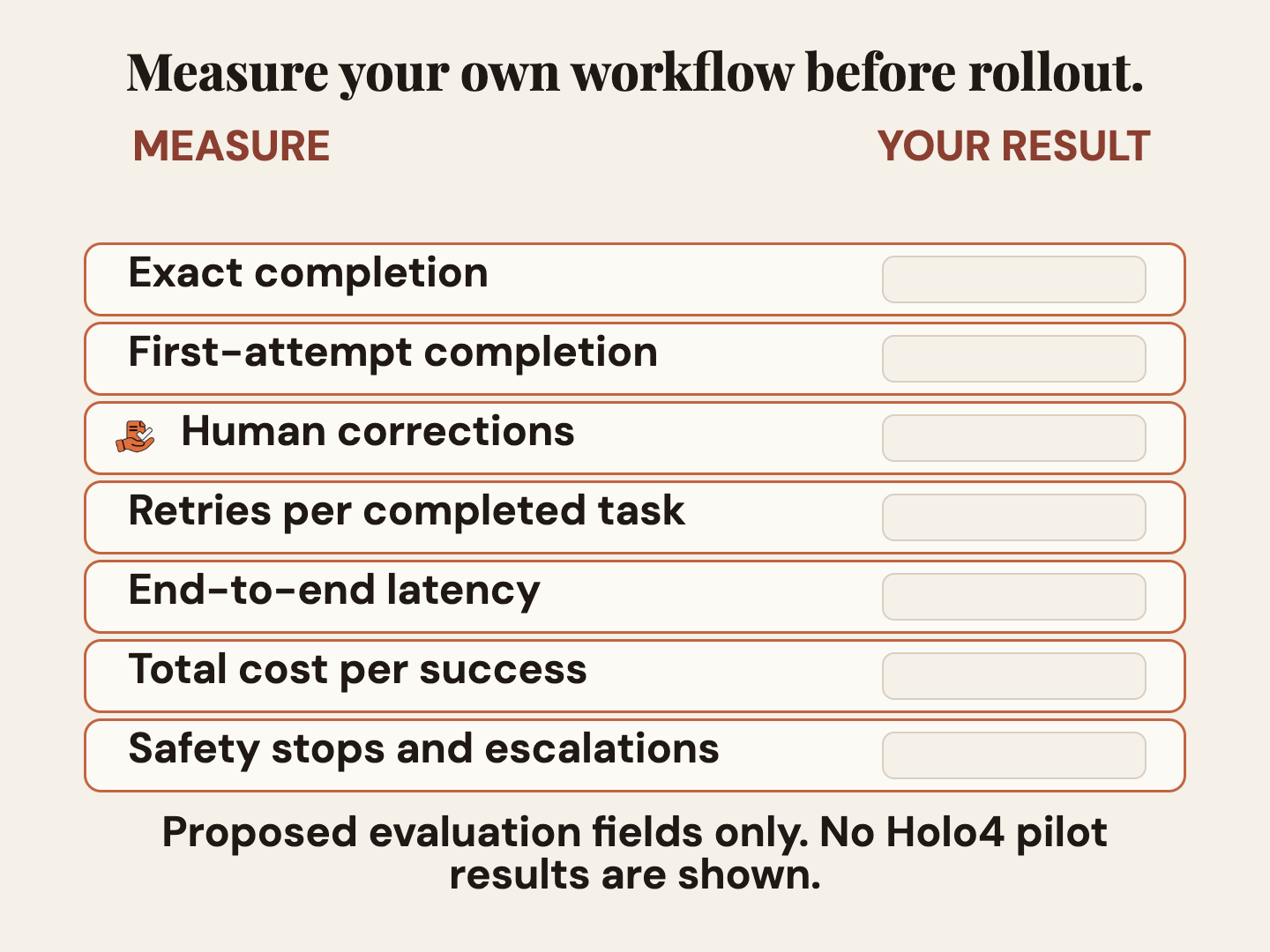
A pilot needs a scorecard before it needs a clever prompt. Pick a small, representative set of tasks and write a completion condition for each. “The agent reached the final screen” is not enough. “The correct record has the approved draft attached, all required fields match the signed source, and no external action occurred” is much more useful.
Separate partial progress from completion. If a task has ten steps and the model handles nine, that can be valuable, but it is not a complete success when the tenth step changes the business outcome. Keep a binary task-completion measure alongside partial-credit measures. Report the number of attempts, not just the best run. Include retries and human interventions, because a system that succeeds only after a person repairs it has a different operating cost from one that finishes inside the defined boundary.
Track the route each step used. For an API call, record method, stable object ID, response and read-back. For MCP, record the named tool and the arguments needed to reproduce the decision without exposing secrets. For code, retain the version, input fixture, output, test result and diff. For GUI actions, record the starting context, state-changing step and post-action view, while respecting privacy and retention rules. A trace should let a reviewer understand why the workflow believes the task is complete.
Set stop conditions as carefully as success conditions. A missing required field, conflicting record, unexpected permission prompt, changed screen, failed verification, duplicate result, or request outside the approved action list should end the automated path. Define whether the workflow can safely retry, whether it must roll back, and who receives the exception. A stop is not a model failure if the correct action is to avoid an unsafe guess.
 View image detail
Measure total cost per accepted outcome, not only token cost per attempt. Include model input and output, tool or computer environment charges, retries, failed tasks, review time and any follow-up correction. H Company’s reported per-task cost figures are vendor estimates from specific benchmark runs. They are useful context, but the unit that matters to your operation is an accepted result under your own policy. If the workflow needs a person to check every output, count that time honestly rather than treating human review as free.
Use a baseline. Compare the current process and the agent-assisted process on the same tasks, definitions and review standard. Avoid changing the workflow, model, prompt and success criteria all at once. Start with a limited test set that includes routine cases, missing data, ambiguous cases and a deliberate exception. Keep the untouched holdout tasks separate from examples used to write or tune prompts. Otherwise, you are measuring how well the workflow remembers its practice set, not how well it handles new work.
Keep evidence separate from the benchmark headline
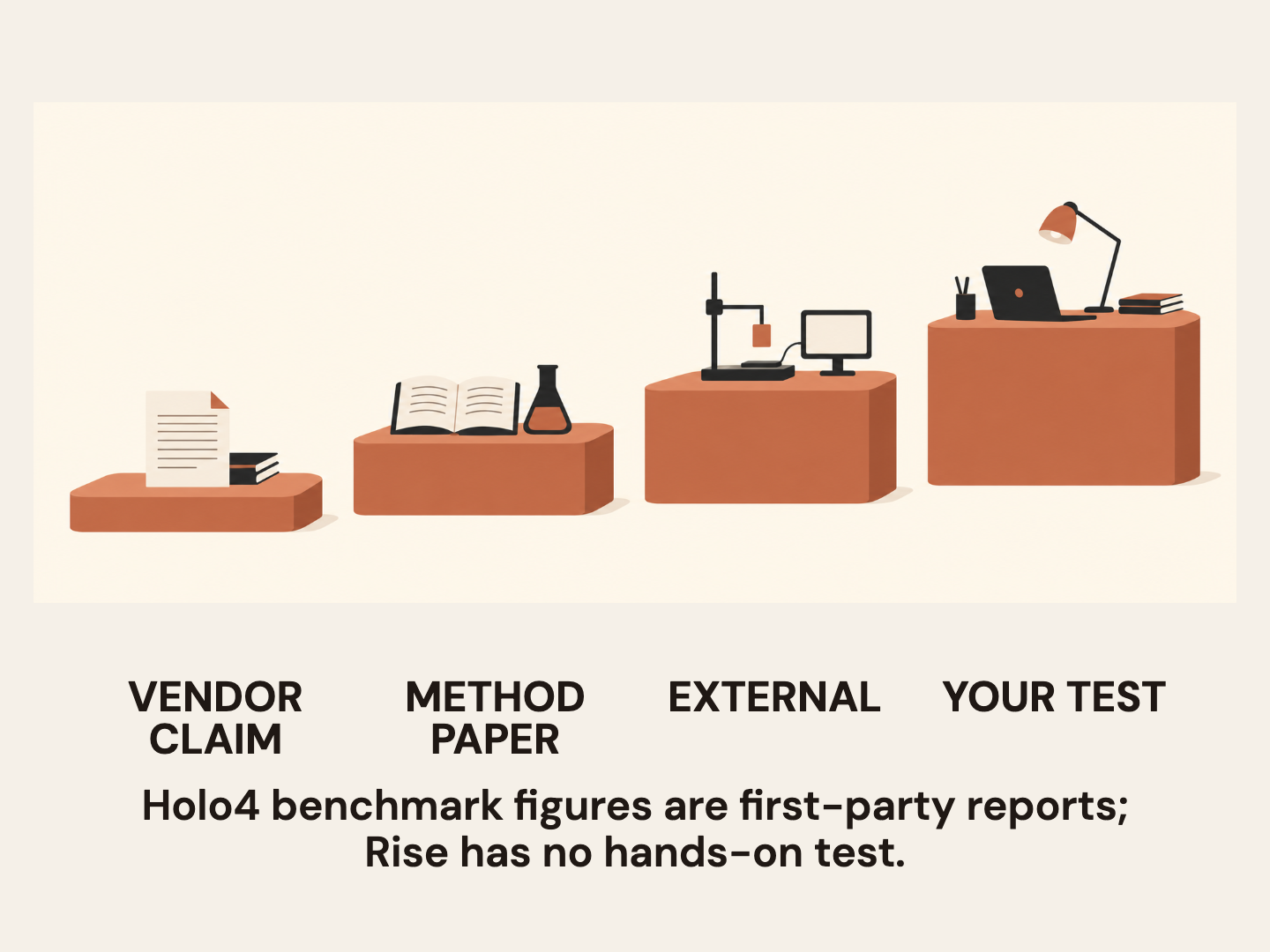
Benchmarks are useful when they tell you what was tested and under what conditions. They become misleading when a score from one harness is used as a proxy for a different application. H’s newsroom reports Holo4’s classic OSWorld and OSWorld 2.0 numbers separately. Keep those rows separate in your notes and any public comparison. Do not subtract one version’s result from the other and call it a regression, improvement or relative rank without a valid comparable protocol.
The OSWorld 2.0 paper is helpful for understanding why this distinction matters. It describes long-horizon workflows and separates partial score from binary task completion. That is a test design lesson, not evidence that Holo4 handles a given business workflow. Translate it into your own evaluation: what does partial progress mean, which steps carry more risk, and what evidence is required to call the whole job done?
AutomationBench offers another useful reminder. Its maintainers distinguish the public tasks from a separate private leaderboard set and caution that public results may not match private results one to one. H Company reports that 480 of the benchmark’s 600 public tasks fall within the split from which it collected training data, then presents results for a separate 120-task held-out portion on its newsroom results page. Keep that overlap disclosure and the held-out distinction next to the vendor’s reported values. Neither the company’s results nor secondary launch articles should be described as independent benchmark reproductions.
A good procurement or engineering conversation can therefore say: “H Company reports these numbers on these named benchmark versions. Its OSWorld 2.0 figures come from a single run, and it discloses training-data overlap with AutomationBench’s public tasks. We have not reproduced them. Here is the task set and verification standard we will use for our decision.” That sentence is less exciting than a leaderboard claim. It is also much more useful to the team that has to own the system after a pilot.
 View image detail
Give each interface a permission and recovery plan
Before connecting an agent to production tools, write down the identity it will use and the smallest permissions it needs. A read-only research job should not inherit write access because a later workflow might need it. Draft creation should be separate from publication. A code sandbox should not receive the user’s whole home directory by default. A browser session should not expose unrelated personal tabs or saved credentials. Prefer short-lived credentials and approved secrets storage; never put tokens in prompts, screenshots or logs.
Decide what gets recorded, where it is stored, who can inspect it and when it is deleted. Computer-use traces and screenshots can contain customer names, internal URLs, personal information or authentication details. A complete audit trail is not a reason to retain everything forever. Capture the minimum evidence needed to verify the decision, redact secrets, and follow the organization’s retention rules.
For a hosted model, verify the specific service terms and account configuration before sending sensitive material. H Company’s public Terms of Service describe the Inference API and, in §6.2, say prompt and visual data are not persistently retained. Its Privacy Policy separately describes 30-day EEA and 90-day non-EEA Input/Output timelines for service improvement, debugging and security, with an exception when users explicitly decide otherwise. It also describes model-training processing unless a user opts out. Elsewhere the policy says data are not persisted, and the page carries conflicting update-date markers. The opt-out statement should not be read as applying to all listed retention purposes. The public Data Processing Agreement template uses different client-set retention and data-reuse language. The Terms say in §10.2 that the DPA forms part of them when H Company processes personal data as a processor. For a real workflow, confirm whether that role applies, which account plan and executed contract cover it, and what the relevant DPA sub-annex and opt-out settings say. Check those specifics with H Company and the appropriate privacy or legal reviewer before sending sensitive data. This is a verification question, not a conclusion about the provider’s practices.
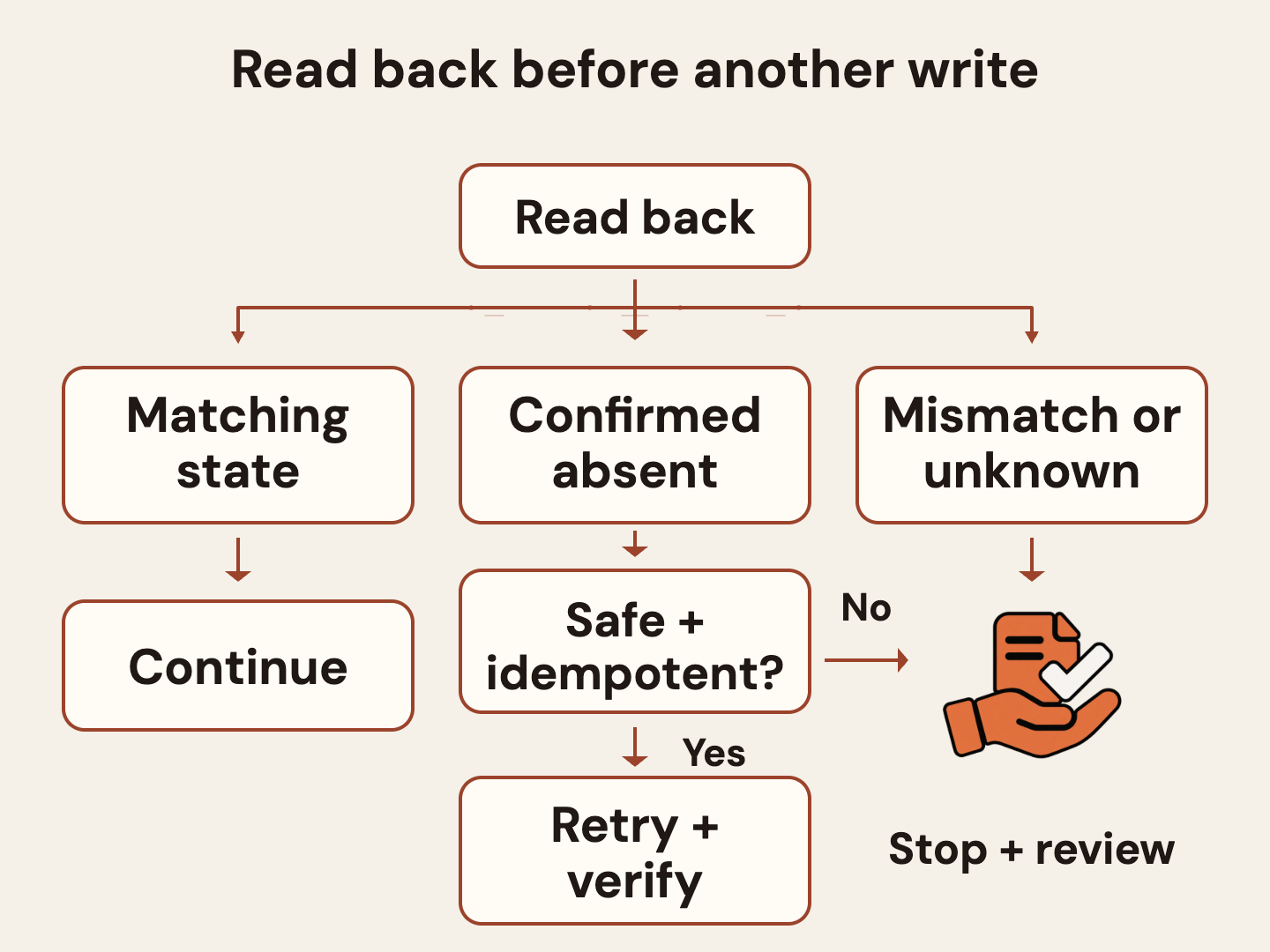
Plan for failure before enabling retries. If an API call times out after the system accepted it, repeating the call may duplicate a record. If a GUI operation times out after a click, the page may have changed even though the agent did not receive confirmation. If a code step creates a partial file, a retry may overwrite or combine outputs. Use idempotent operations where possible, check the state before retrying, and make the recovery path explicit. If you cannot tell whether a consequential action happened, stop and ask a human to inspect the system of record.
The test harness should deliberately include these interruptions. Add a timeout after a simulated write, an ambiguous match, a missing value, a stale session and a page that does not match expectations. Record whether the workflow stops, retries safely or needs intervention. A clean demo on a happy path tells you little about recovery. A safe agent must know when it cannot establish what happened.
 View image detail
A practical rollout sequence
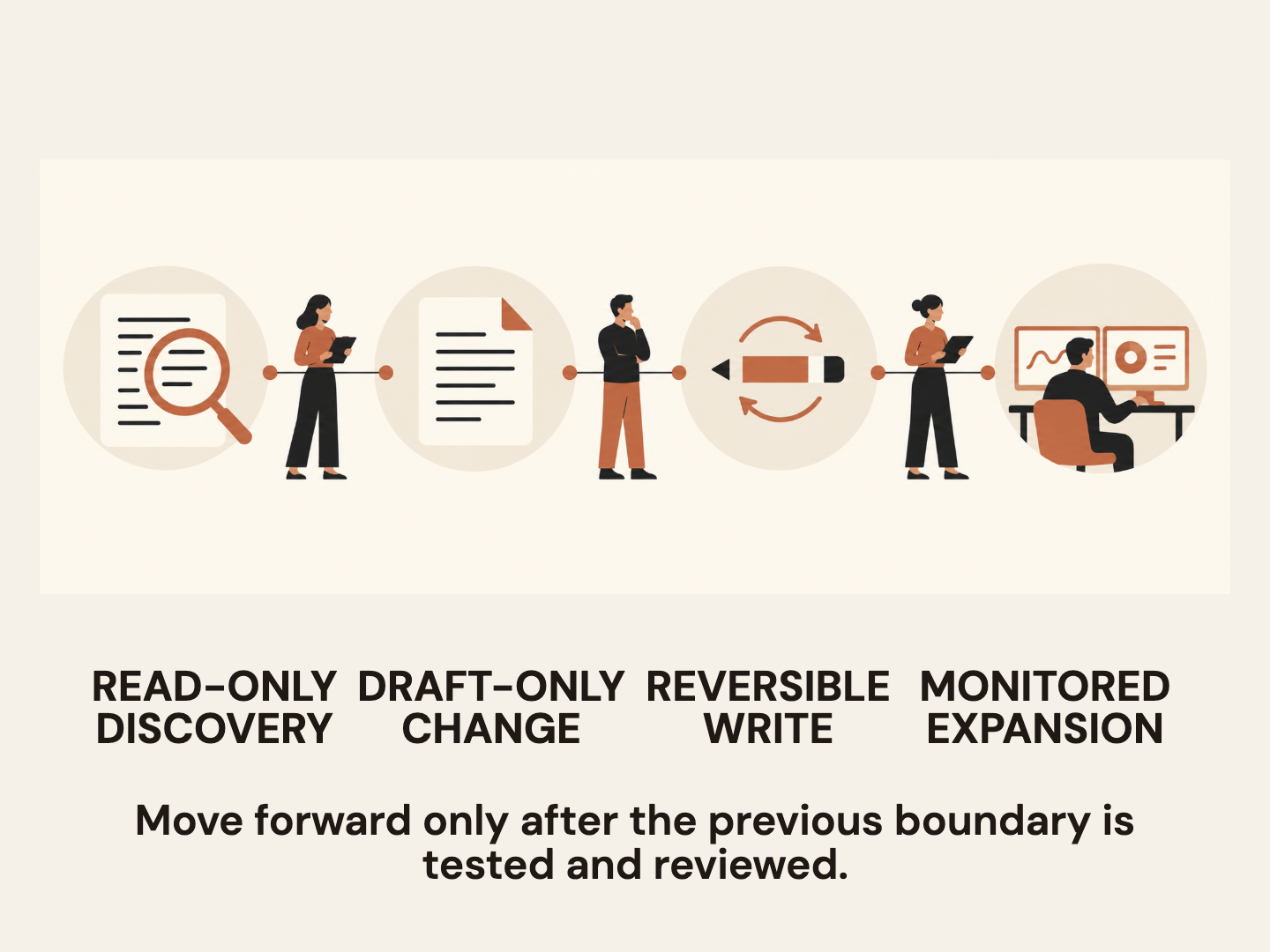
Begin read-only. Ask the workflow to find a record, summarize its source fields and show the citations or object IDs it used. Check a sample manually. Then let it create drafts with no send, publish, delete or permission-changing tools available. Test the post-action read-back and exception route. Only then consider a narrow write permission for a reversible action, and keep it limited to a small user group and monitored task set.
Write down the allowed actions in operational language. For example: “You may retrieve the agreement identified by this customer ID, extract these five fields, and create a draft handoff. You may not choose a customer when the ID is missing, alter the signed agreement, change account access, or send an external message.” Clear limits are more effective than telling a model to “be careful.” Enforce them in the tool permissions and application logic, not only in the prompt.
After a pilot, review every mismatch and near miss. Ask whether the failure came from an unclear task, wrong source, weak selector, brittle screen, tool contract, missing postcondition or an overbroad permission. Fix the system boundary where possible. Re-run the same task and a clean holdout set. Keep a versioned record of the prompt, model, tool schemas, access scope and evaluation set so that a changed model or connector does not silently inherit an old approval.
This is where the four-interface story can become practical. A model can support a connected sequence, but your architecture can keep the individual steps legible. It can use a GUI to inspect a screen, code to validate values, MCP to call a named operation, and an API to read the resulting record. Or it can use only one route. The right design is not the one that touches the most tools; it is the one that reaches the required state with the least ambiguity and the best evidence.
 View image detail
The decision to make
Holo4’s multi-interface approach is worth evaluating if your work genuinely crosses interface boundaries or if a needed task is trapped in a user interface that lacks an approved integration. If your workflow already has a stable API for the operation, start there. Add MCP when named tools and resources simplify a controlled connection. Use code for deterministic transformations that can be sandboxed and tested. Use the GUI when the visible application is part of the task or no better supported route exists. Do not force every job through every surface just because one model can move among them.
Then define the pilot around a real task, not the announcement. Choose representative cases, specify the expected final state, separate partial progress from full completion, record each handoff and count human correction in total cost. Keep external or irreversible actions behind a person until the workflow proves its boundaries and recovery behavior under your own conditions. If the system cannot verify what happened, it is not done.
The interesting promise here is not that an agent can click, call a tool, run code and query a service in one uninterrupted performance. It is that a team might design a workflow that uses the right interface for each small job and can show its work at the boundaries. The design burden remains yours. That is a good thing: the model can help perform the task, while people still decide what the task is allowed to change and what counts as evidence.
 View image detail
Checked for this article
Sources
- H Company newsroom: Holo4hcompany.ai
- Hugging Face team blog: Holo4huggingface.co
- Holo4-27B model cardhuggingface.co
- Holo4-35B-A3B model cardhuggingface.co
- OSWorld 2.0 paperarxiv.org
- AutomationBench repositorygithub.com
- H Company Terms of Usehcompany.ai
- H Company Privacy Policyhcompany.ai
- H Company Data Processing Agreement templatehcompany.ai
Keep going
Related notes.

AI in Practice
Holo4 for Business: Check Licenses, API Data Terms, and Self-Hosting
Holo4's downloadable checkpoints have different weight licenses, while its hosted API has separate account terms. Learn what to check before choosing a route.
Read the article
AI in Practice
Exa Agent Ultra: When Is Exhaustive AI Research Worth It?
When is Exa Agent Ultra worth it? See what its $20 default cap and vendor-reported benchmarks mean, then test it against a completeness target.
Read the article
AI in Practice
Base44 Base Code Pilot: Choosing a Safe First Change
A practical way to choose a safe Base Code task: check project fit, set acceptance criteria, review the preview and diff, and keep release decisions with your team.
Read the article