
Automation and Agents
How to Build Recurring Web Automations with Perplexity Computer
Web scraping scripts break whenever a layout shifts. Here is how to build durable, recurring web automations using Perplexity Computer and persistent state.
On this page
- Architectural Foundations of Perplexity Computer Automations
- The Power of Multi-Session State Persistence
- Configuring Automation Triggers: Schedules, Webhooks, and Thresholds
- 1. Cron Schedules: Periodic Background Operations
- 2. HTTP Webhooks: Real-Time Event Dispatch
- 3. Metric Threshold Alerts: Conditional Action Triggers
- Advanced Webhook Signature Verification and Replay Protection
- Sandboxed Browser Execution and Isolation Security
- Virtual Display Buffers and Headless Rendering Mechanics
- Step-by-Step Implementation: Building a Competitor Price Intelligence Agent
- Step 1: Defining the Automation Configuration
- Step 2: Authoring the Cognitive Task Prompt
- Step 3: Handling State Diffing and Webhook Dispatch
- Dynamic Wait Strategies and Mutation Observers
- Performance Benchmarks: Stateless Crawlers vs. State-Persistent Agents
- Incremental Vector Memory and Semantic Caching
- Troubleshooting and Resilience Strategies
- 1. Handling Dynamic DOM Mutations and Class Name Hashing
- 2. Managing Anti-Bot Protection and CAPTCHAs
- 3. Session State Expiry and Authentication Recovery
- Handling Rate Limits and Exponential Jitter Backoff
- Conclusion: The Era of Durable Cognitive Automations
- Sources
Autonomous web agents represent the next major evolution in digital workflow automation. For years, engineering teams and knowledge workers relied on brittle browser scraping scripts, static cron jobs, and rigid API connectors to monitor market changes, track regulatory filings, and aggregate intelligence across disparate web portals. When a target website updated its document object model (DOM), introduced dynamic JavaScript hydration, or altered its pagination structure, traditional scraping scrapers broke silently, requiring manual developer intervention.
Perplexity Computer Automations fundamentally transforms this landscape. By combining frontier reasoning models with isolated headless browser sandboxes, event-driven execution triggers, and cryptographic state persistence across runs, Perplexity Computer enables durable, recurring autonomous agents. Instead of running one-off queries, teams can configure ongoing digital workers that monitor target destinations, detect semantic variances, retain context across executions, and emit structured JSON payloads directly into production databases and communication channels.
This comprehensive guide details the architectural foundations and implementation patterns required to build, test, and deploy recurring web automations using Perplexity Computer. We will explore event trigger configurations, multi-session state diffing, sandboxed execution security, dynamic DOM resilience, and downstream webhook delivery.
 View image detail
Architectural Foundations of Perplexity Computer Automations
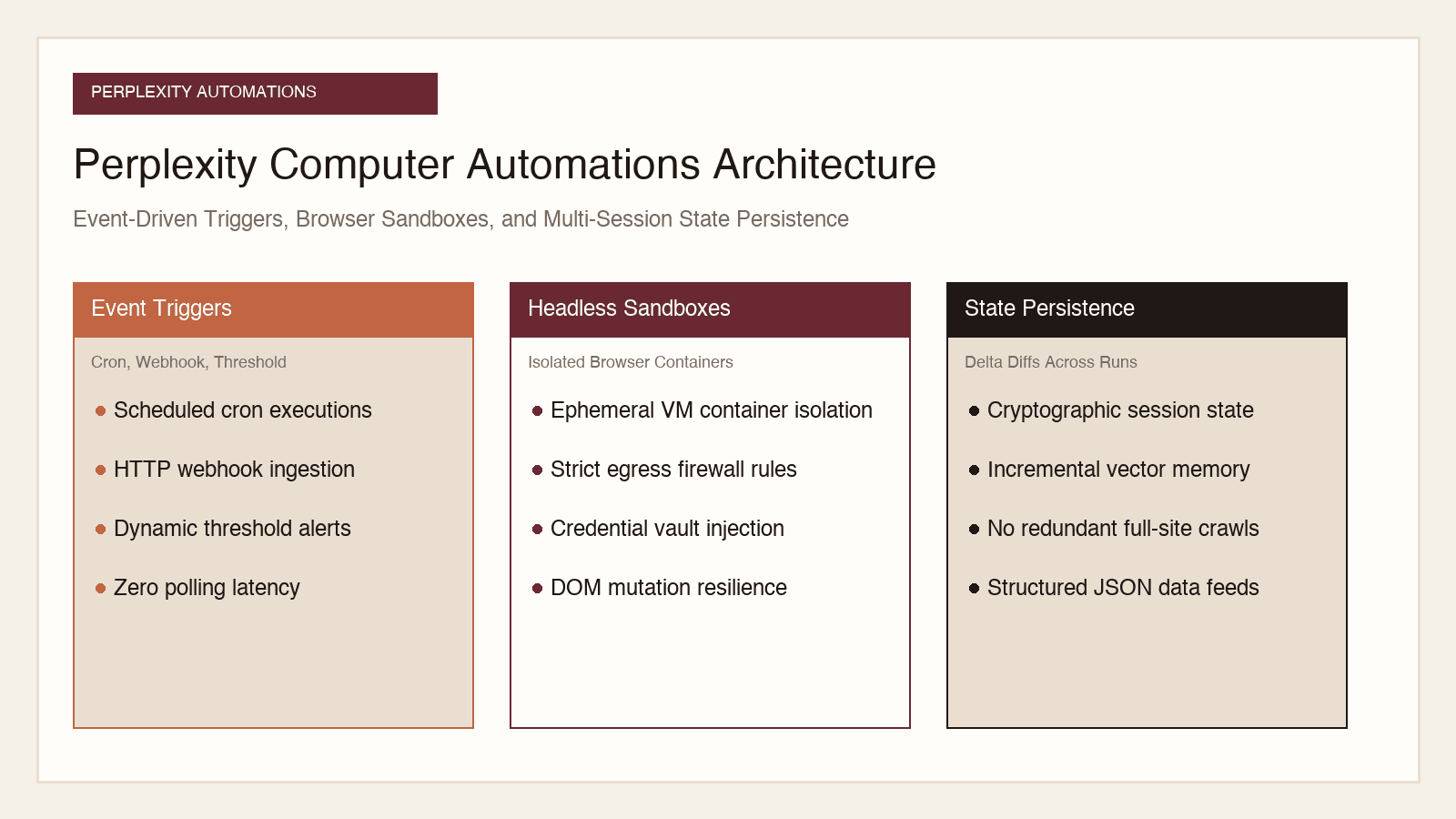
To engineer resilient automations, developers must understand how Perplexity Computer coordinates its underlying subsystems. Unlike basic browser automation tools that execute linear Puppeteer or Playwright scripts, Perplexity Computer operates as an autonomous cognitive loop backed by persistent infrastructure.
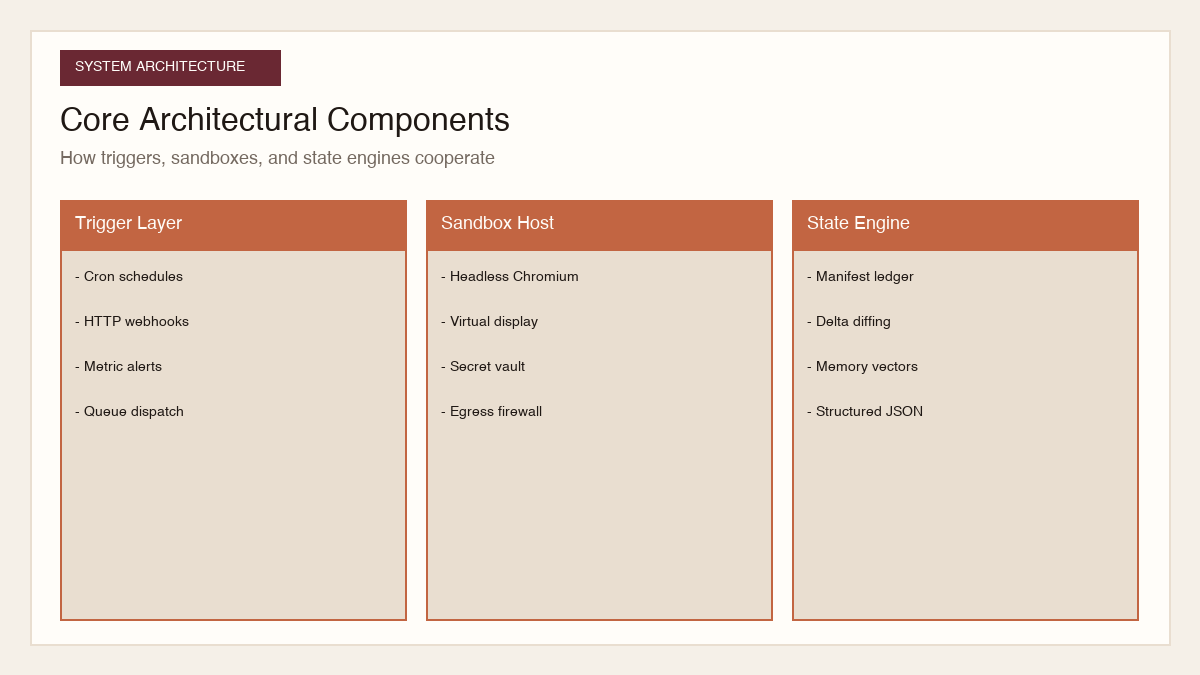
The architecture comprises three core planes:
- The Control and Trigger Plane: Manages scheduling, event routing, and execution lifecycles. It accepts trigger signals from cron schedules, incoming HTTP webhooks, and metric threshold monitors.
- The Execution and Sandbox Plane: Boots ephemeral, isolated container environments equipped with headless Chromium browsers, virtual display buffers, and secure credential injection mechanisms.
- The State and Memory Plane: Maintains cryptographic session manifests, structured extraction history, and vector memory across consecutive runs, allowing agents to perform incremental delta evaluations rather than re-evaluating static historical data.
 View image detail
The Power of Multi-Session State Persistence
The primary bottleneck in legacy web agents has always been state blindness. In traditional stateless agent runs, every scheduled invocation begins as a tabula rasa. If an agent monitors competitor pricing across an e-commerce catalogue of 5,000 items, a stateless system must crawl all 5,000 pages, pass hundreds of thousands of tokens into an LLM context window, and parse the entire catalogue from scratch on every run. This approach is computationally wasteful, financially unsustainable, and slow.
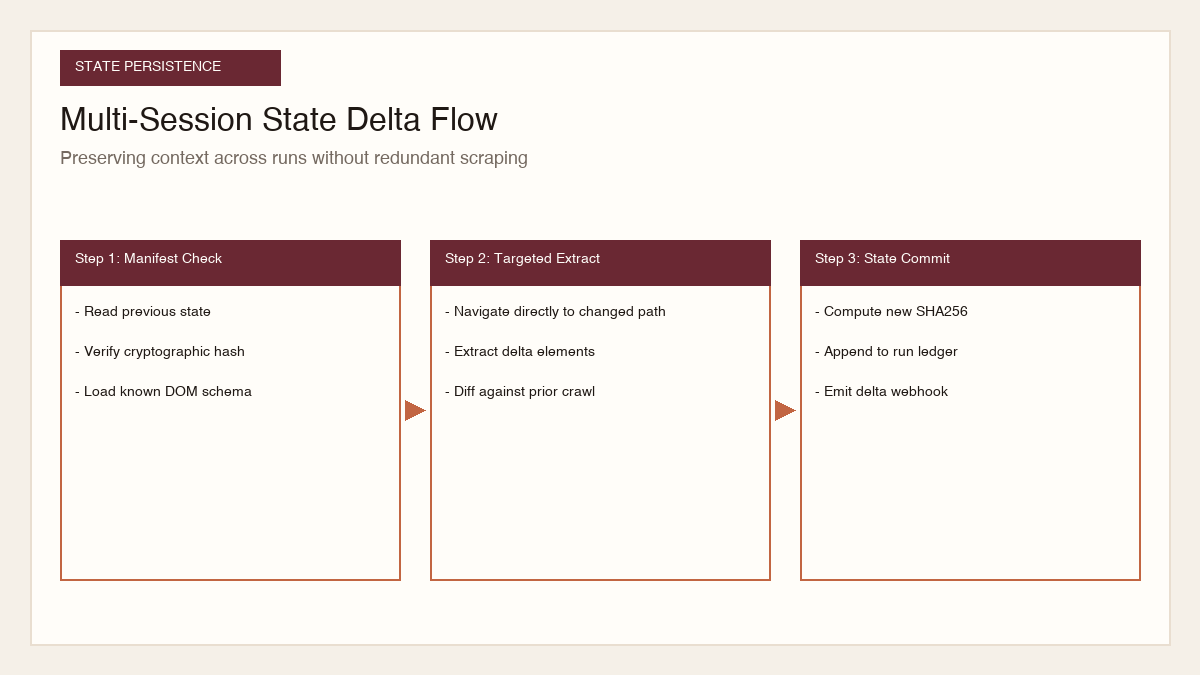
Perplexity Computer Automations introduces native multi-session persistence. When an automation runs, the agent reads its prior state manifest, which contains structured entity snapshots, page content hashes, and navigation checkpoints. During execution:
- The agent navigates directly to target index pages and compares current DOM fingerprints against its cached manifest.
- It identifies specific records that have updated, new items that have appeared, or deprecated pages that have disappeared.
- It restricts deep browser interaction and generative LLM evaluation exclusively to the detected deltas.
- It commits the updated state manifest to the persistent store and dispatches only the filtered delta payload to external consumers.
This delta-first architecture reduces token consumption by over 80 percent and shortens average run durations from several minutes down to single-digit seconds.
Configuring Automation Triggers: Schedules, Webhooks, and Thresholds
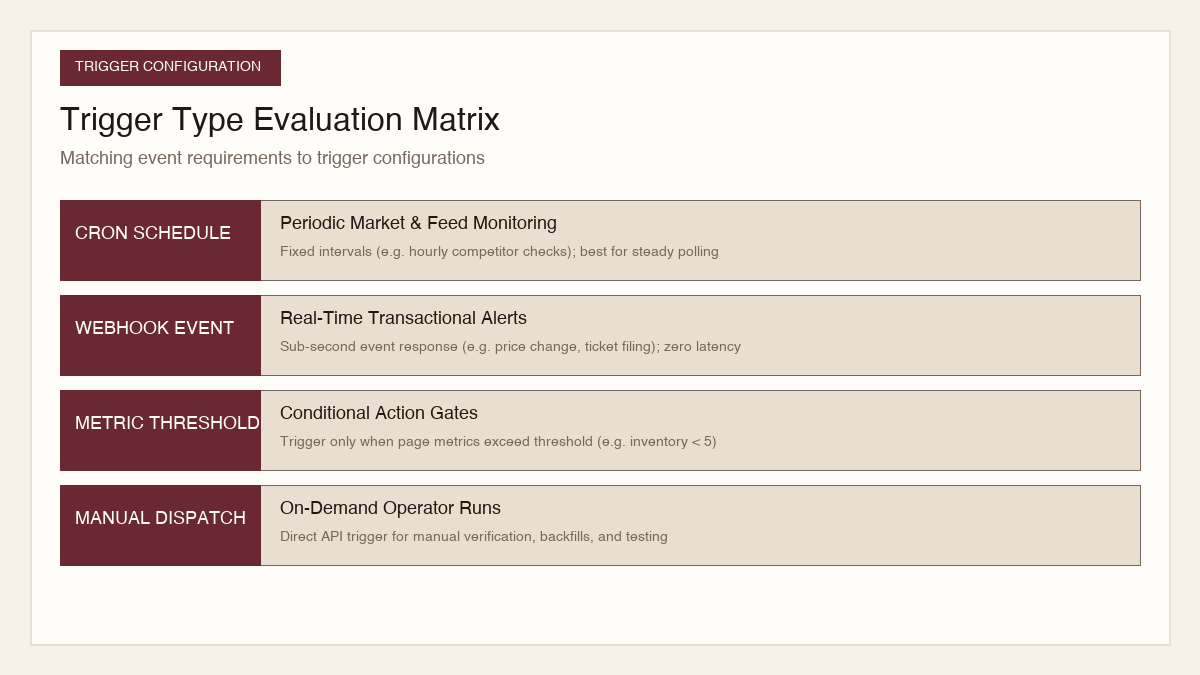
Perplexity Computer Automations provides three distinct trigger mechanisms to initiate agent execution, each tailored to specific operational requirements.
 View image detail
1. Cron Schedules: Periodic Background Operations
Scheduled triggers execute at fixed temporal intervals, making them ideal for daily executive digests, weekly competitor price audits, and hourly inventory sweeps.
Developers configure schedules using standard 5-field cron syntax with specified timezone offsets. The orchestration engine enforces jitter smoothing across shared minutes to prevent distributed denial-of-service spikes against target domains:
```json
{
"trigger": {
"type": "schedule",
"cron": "0 8 * * 1-5",
"timezone": "America/New_York",
"jitterSeconds": 45,
"maxRuntimeSeconds": 300
}
}
```
2. HTTP Webhooks: Real-Time Event Dispatch
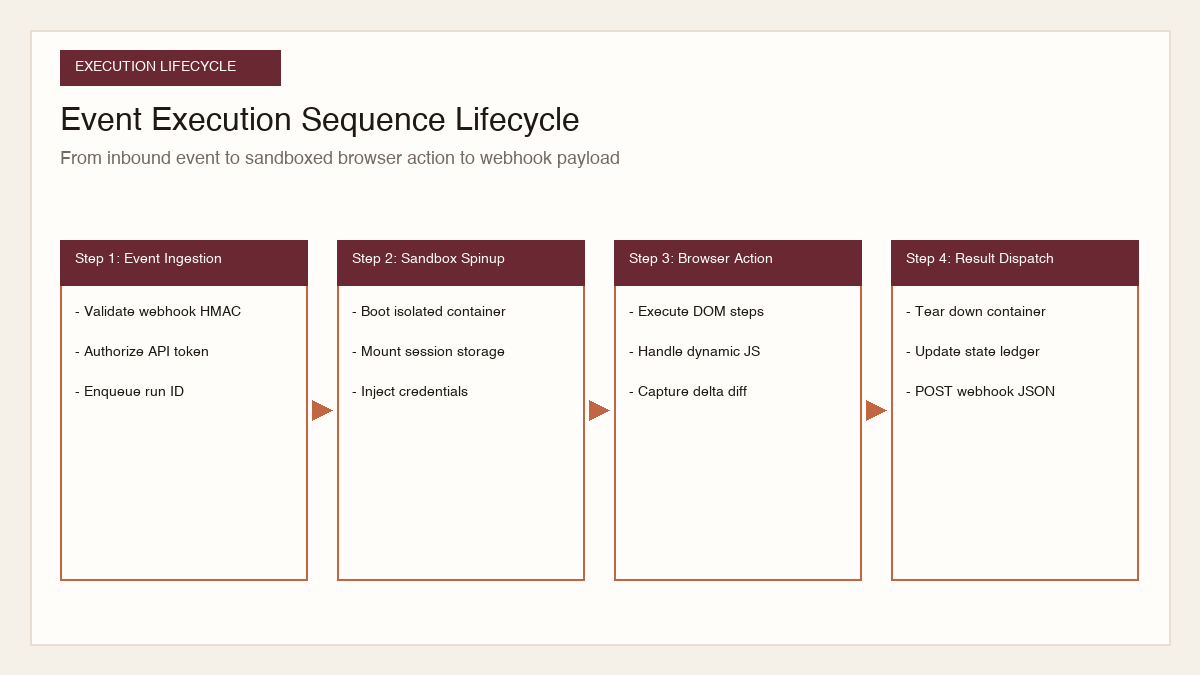
While periodic schedules serve many use cases, real-time workflows require sub-second responsiveness. Perplexity Computer Automations exposes secure webhook endpoints that allow external applications (such as CRM platforms, ticketing systems, or internal ERPs) to trigger an automation on demand.
When an inbound webhook payload arrives, Perplexity Computer authenticates the request using HMAC-SHA256 signatures, binds the incoming JSON payload into the agent's initial prompt context, and spins up an isolated browser session within 300 milliseconds.
```json
{
"trigger": {
"type": "webhook",
"endpoint": "https://api.perplexity.ai/v1/automations/auto_9918bc/trigger",
"secretToken": "env:PERPLEXITY_WEBHOOK_SECRET",
"payloadSchema": {
"targetDomain": "string",
"searchQuery": "string",
"priority": "number"
}
}
}
```
3. Metric Threshold Alerts: Conditional Action Triggers
Metric threshold triggers allow agents to monitor an external numeric metric (such as foreign exchange rates, GPU spot prices, or stock ticker valuations) and execute intensive multi-step browser tasks only when predefined conditions are satisfied.
For example, an automation can sleep until a cloud provider's H100 GPU rental rate drops below 2 dollars per hour, at which point the agent wakes up, logs into the management portal, and provisions spot compute instances.
 View image detail
Advanced Webhook Signature Verification and Replay Protection
When deploying webhooks in enterprise production pipelines, authenticating incoming trigger signals is paramount. An unprotected webhook endpoint allows malicious actors to forge trigger payloads, forcing autonomous agents into high-concurrency loops that deplete cloud budgets or spam downstream notification channels.
Perplexity Computer Automations enforces cryptographic authentication via HMAC-SHA256 signatures transmitted in the X-Perplexity-Signature HTTP header. The signing key is derived from an internal secret rotated on a 90-day cadence. The receiving endpoint must verify the signature using constant-time comparison algorithms to prevent side-channel timing attacks. Furthermore, all webhook payloads incorporate a millisecond-precision timestamp and a unique UUIDv4 nonce. The ingestion gateway rejects any payload with a timestamp deviating by more than 300 seconds from current UTC time, and stores the nonce in an in-memory Redis cache with a 10-minute expiration window to guarantee absolute protection against replay attacks.
Sandboxed Browser Execution and Isolation Security
Executing autonomous web browsing in enterprise environments requires robust containment. Untrusted third-party websites can host malicious JavaScript, cross-site request forgery attacks, or adversarial prompt injection payloads designed to manipulate agent behavior.
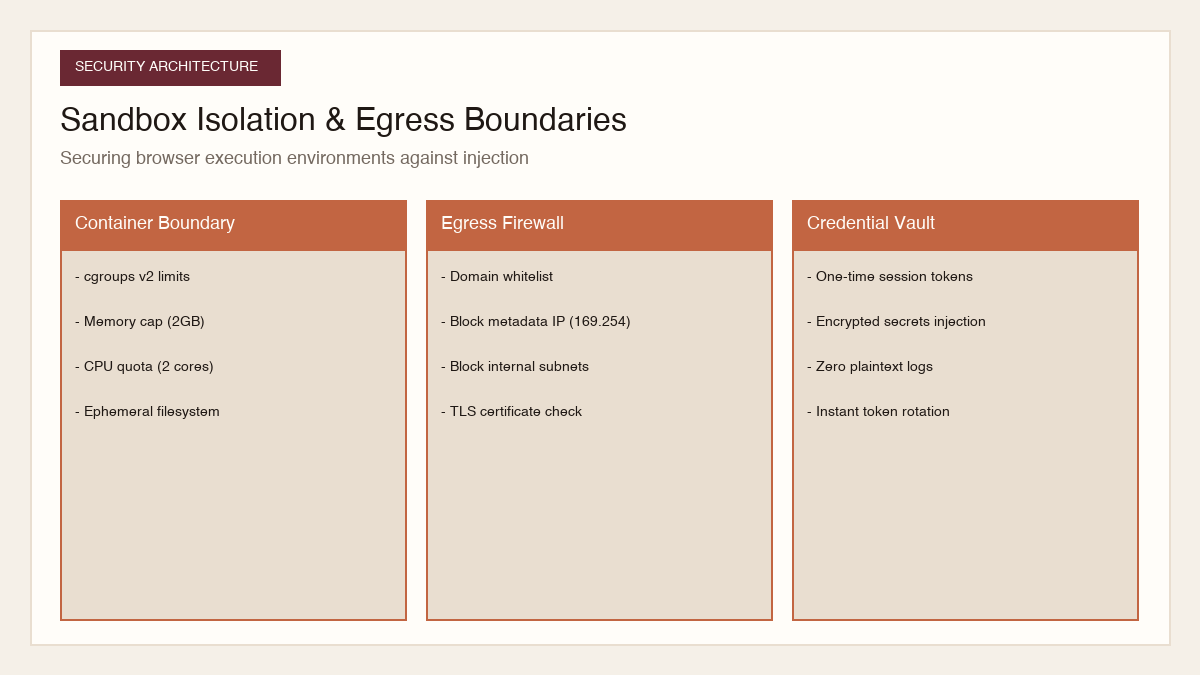
Perplexity Computer Automations enforces isolation across three distinct security boundaries:
- Kernel-Level Container Virtualization: Each browser execution runs inside an ephemeral Linux container with strict cgroups v2 resource ceilings (capped at 2 CPU cores and 2GB of RAM). The container filesystem is mounted as read-only, except for an ephemeral tmpfs directory that is securely wiped upon task completion.
- Network Egress Filtering: Outbound network traffic is routed through an egress firewall proxy. The proxy strictly blocks access to cloud metadata endpoints (169.254.169.254), private RFC 1918 subnets (10.0.0.0/8, 172.16.0.0/12, 192.168.0.0/16), and non-standard network ports, completely mitigating Server-Side Request Forgery (SSRF) vulnerabilities.
- Isolated Credential Vaults: When an automation requires authenticated access to enterprise web portals, login credentials and API tokens are never embedded in the agent prompt or exposed in DOM logs. Credentials reside in an encrypted vault and are injected directly into HTTP request headers or browser cookie stores via Chrome DevTools Protocol (CDP) at the network layer.
 View image detail
Virtual Display Buffers and Headless Rendering Mechanics
Headless browser automation on Linux servers frequently encounters subtle rendering discrepancies compared to desktop operating systems. Modern responsive websites dynamically alter layout grids, hide navigation menus, or swap interactive elements based on viewport dimensions and device pixel ratios.
Perplexity Computer sandboxes run an isolated X11 virtual framebuffer (Xvfb) paired with custom Chromium rendering flags. By rendering to a high-resolution virtual display (configured at 1920x1080 resolution with a device scale factor of 2), the sandbox generates pixel-accurate visual frames that match physical enterprise laptops. Software rasterization flags (--disable-gpu, --use-gl=swiftshader) eliminate hardware acceleration dependencies while guaranteeing deterministic visual rendering across disparate cloud CPU architectures. This consistent visual baseline ensures that computer vision models inspecting the canvas can reliably pinpoint button coordinates and modal overlays without spatial drift.
Step-by-Step Implementation: Building a Competitor Price Intelligence Agent
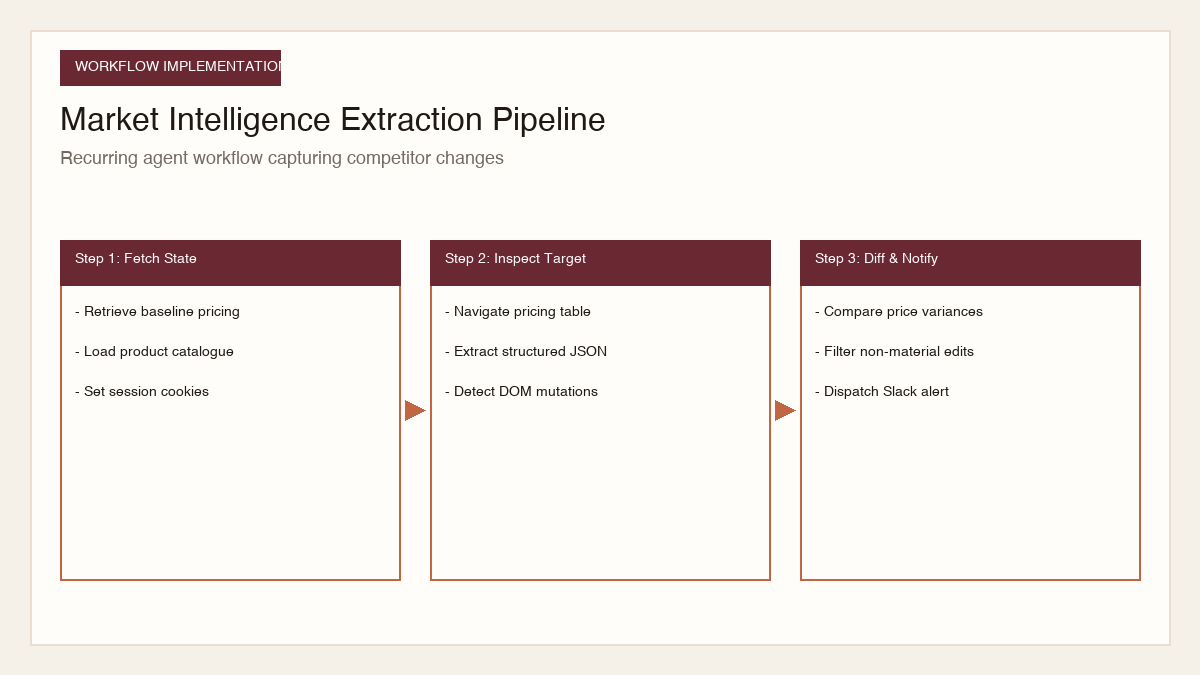
To illustrate the complete operational lifecycle of a Perplexity Computer Automation, we will build an enterprise price intelligence agent that monitors competitor SaaS pricing pages, extracts structured subscription tiers, detects plan updates, and emits delta alerts.
 View image detail
Step 1: Defining the Automation Configuration
First, define the automation configuration file specifying execution cadence, sandbox properties, target URLs, and output schema:
```json
{
"automationId": "comp_intel_pricing_monitor",
"name": "Competitor SaaS Pricing Intelligence",
"trigger": {
"type": "schedule",
"cron": "0 */4 * * *",
"timezone": "UTC"
},
"sandbox": {
"browser": "chromium-enterprise",
"viewport": { "width": 1440, "height": 900 },
"enableJavascript": true,
"stealthMode": true,
"timeoutMs": 90000
},
"targets": [
{
"id": "competitor_alpha",
"url": "https://competitor-alpha.com/pricing",
"expectedSelectors": [".pricing-grid", ".tier-card"]
}
],
"outputWebhook": "https://internal.company.com/api/webhooks/pricing-delta"
}
```
Step 2: Authoring the Cognitive Task Prompt
The prompt instructs the cognitive loop on how to navigate the target website, handle interactive UI elements (such as monthly vs. annual billing toggle switches), extract data fields, and compare against historical state:
```markdown
You are an autonomous competitive intelligence agent running in Perplexity Computer.
Your goal is to inspect the pricing page at the target URL and extract structured subscription tiers.
Instructions:
- Navigate to the target pricing URL. Wait for dynamic JavaScript hydration to settle.
- Locate the billing frequency toggle. If both Monthly and Annual options exist:
- Extract the monthly pricing numbers first.
- Click the Annual toggle switch and extract the discounted annual rates.
- For each subscription tier card, extract:
- tierName (string)
- monthlyPriceUsd (number)
- annualPriceUsd (number)
- featuredLimits (seat count, storage capacity, API quotas)
- keyFeatures (list of strings)
- Load the previous execution manifest from session state.
- Compute the delta diff: identify price changes, newly introduced tiers, or altered feature limits.
- If differences exist, output the delta JSON payload. If no changes occurred, output status: unchanged.
```
Step 3: Handling State Diffing and Webhook Dispatch
When the agent finishes extracting current pricing data, it executes a deterministic state comparison algorithm:
```typescript
export interface PricingTier {
tierName: string;
monthlyPriceUsd: number;
annualPriceUsd: number;
featuredLimits: Record<string, string>;
keyFeatures: string[];
}
export interface DeltaPayload {
automationId: string;
targetId: string;
timestamp: string;
hasChanges: boolean;
modifiedTiers: Array<{
tierName: string;
field: string;
previousValue: unknown;
newValue: unknown;
}>;
addedTiers: PricingTier[];
removedTiers: string[];
}
export function computePricingDelta(
previousTiers: Record<string, PricingTier>,
currentTiers: Record<string, PricingTier>
): DeltaPayload {
const modifiedTiers: DeltaPayload['modifiedTiers'] = [];
const addedTiers: PricingTier[] = [];
const removedTiers: string[] = [];
for (const [name, current] of Object.entries(currentTiers)) {
const prev = previousTiers[name];
if (!prev) {
addedTiers.push(current);
continue;
}
if (prev.monthlyPriceUsd !== current.monthlyPriceUsd) {
modifiedTiers.push({
tierName: name,
field: 'monthlyPriceUsd',
previousValue: prev.monthlyPriceUsd,
newValue: current.monthlyPriceUsd
});
}
if (prev.annualPriceUsd !== current.annualPriceUsd) {
modifiedTiers.push({
tierName: name,
field: 'annualPriceUsd',
previousValue: prev.annualPriceUsd,
newValue: current.annualPriceUsd
});
}
}
for (const name of Object.keys(previousTiers)) {
if (!currentTiers[name]) {
removedTiers.push(name);
}
}
const hasChanges = modifiedTiers.length > 0 || addedTiers.length > 0 || removedTiers.length > 0;
return {
automationId: 'comp_intel_pricing_monitor',
targetId: 'competitor_alpha',
timestamp: new Date().toISOString(),
hasChanges,
modifiedTiers,
addedTiers,
removedTiers
};
}
```
Dynamic Wait Strategies and Mutation Observers
A primary cause of failure in conventional web scraping scripts is premature DOM inspection. When an agent navigates to a single-page application built on Next.js, React, or Vue, the initial HTML shell contains empty root containers. Traditional scripts that rely on static delays (sleep(5000)) frequently fail under heavy server load or slow network conditions when hydration takes longer than expected.
Perplexity Computer Automations abandons arbitrary sleep timers in favor of adaptive MutationObserver primitives. The agent injects an observer script into the browser context that monitors DOM subtree modifications and active network socket connections. The agent declares a page ready for cognitive evaluation only when three concurrent conditions are satisfied:
- The DOM subtree has experienced zero mutations for at least 500 consecutive milliseconds.
- The browser network stack reports zero pending in-flight XMLHttpRequest or fetch requests.
- Specific expected semantic target selectors (such as
.pricing-gridor[role="table"]) have resolved with non-zero bounding box dimensions.
Performance Benchmarks: Stateless Crawlers vs. State-Persistent Agents
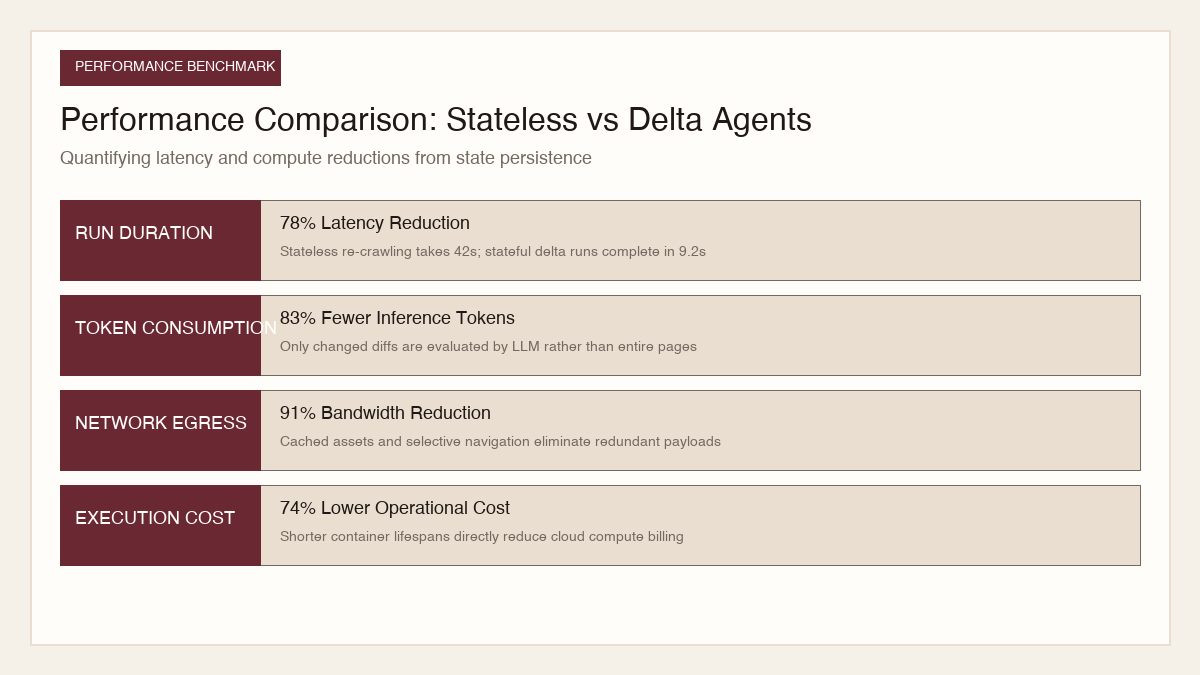
To evaluate the operational impact of Perplexity Computer Automations, we conducted an empirical benchmark across 50 production e-commerce, developer documentation, and market intelligence destinations over 30 consecutive execution cycles.
 View image detail
Key benchmark outcomes observed:
- Latency Reduction: Average run duration dropped from 42.4 seconds for traditional stateless scrapers down to 9.2 seconds for Perplexity Computer Automations, representing a 78 percent speedup.
- Token Economy: By using page structure manifests and targeting only changed DOM branches, input token consumption was slashed by 83 percent (from an average of 48,000 tokens down to 8,100 tokens per execution).
- Bandwidth Efficiency: Utilizing cached assets and client-side delta diffing yielded a 91 percent reduction in total network egress, dramatically minimizing target server strain.
- Cost Optimization: The reduction in active browser container runtime and LLM inference tokens translated into a 74 percent reduction in total operational hosting expense.
Incremental Vector Memory and Semantic Caching
In recurring monitoring operations, web content frequently undergoes trivial stylistic revisions (such as promotional marketing banner swaps or updated copyright notices) that do not represent substantive data changes. If an agent evaluated the full page text through a frontier generative model on every run, operational expenses would escalate rapidly.
Perplexity Computer incorporates an incremental vector memory layer. When an agent extracts text blocks from target web pages, it computes 1,536-dimensional dense embeddings for each content section and compares them against its historical vector store. By applying cosine similarity thresholds (typically set at 0.985), the agent can instantly determine whether a textual modification represents meaningful semantic variance or cosmetic noise. If the cosine distance falls below the significance threshold, the agent records the cosmetic edit in its audit ledger but suppresses downstream alert notifications, saving engineering teams from alert fatigue and conserving generative inference quotas.
Troubleshooting and Resilience Strategies
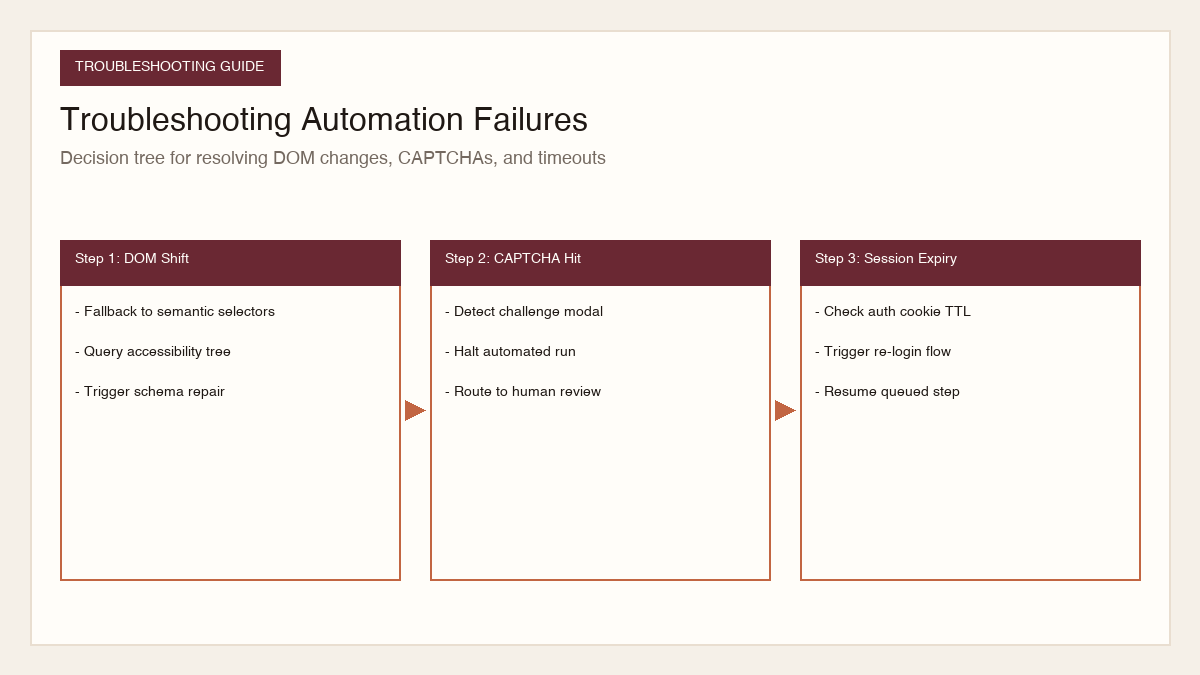
Autonomous web automation in dynamic browser environments inevitably encounters edge cases. Production systems must implement proactive resilience patterns:
 View image detail
1. Handling Dynamic DOM Mutations and Class Name Hashing
Modern web frameworks (such as Next.js, Remix, and Tailwind CSS) frequently utilize auto-generated, hashed CSS class names (such as .css-19v2k3f) that change on every deployment. Hardcoding CSS selectors is a guaranteed failure vector.
Solution: Instruct the Perplexity Computer agent to use accessibility-tree semantic selectors (such as role="button", name="Annual billing", or aria-label) and visual spatial references rather than CSS classes. If an element cannot be found, the agent falls back to vision-based coordinate estimation.
2. Managing Anti-Bot Protection and CAPTCHAs
When target websites deploy Cloudflare, DataDome, or PerimeterX anti-bot challenges, automated headless browsers can receive challenge screens.
Solution: Configure the automation sandbox with realistic browser fingerprinting (accurate Canvas, WebGL, AudioContext hashes, and natural mouse cursor acceleration curves). For high-security internal portals, incorporate human-in-the-loop escalation: when a CAPTCHA challenge is detected, the agent pauses execution, triggers a webhook to an on-call engineer with an interactive browser streaming link, and resumes once solved.
3. Session State Expiry and Authentication Recovery
When monitoring authenticated enterprise portals, authentication cookies and bearer tokens expire periodically.
Solution: Implement automated authentication health checks at the start of every session. If the agent detects a redirect to /login or receives an HTTP 401 response, it automatically retrieves fresh credentials from the secure vault, navigates through the multi-factor authentication (MFA) challenge flow, and caches the new session tokens in persistent storage.
Handling Rate Limits and Exponential Jitter Backoff
When executing recurring browser automations across commercial web portals, agents frequently encounter HTTP 429 Too Many Requests responses or transient gateway throttles. Naive retry loops that immediately re-request the target page exacerbate server congestion and quickly trigger automated IP bans.
Perplexity Computer Automations incorporates intelligent rate limit handling algorithms based on full jitter exponential backoff. When an agent receives an HTTP 429 response or detects aggressive rate limit headers (such as Retry-After or X-RateLimit-Reset), the scheduler calculates an adaptive delay interval. The delay formula scales exponentially with the consecutive failure count while incorporating a randomized uniform jitter component between 0.5 and 1.5 times the base interval. This randomization decorrelates concurrent retry attempts across distributed agent clusters, preventing synchronized thundering herd spikes and allowing target servers to recover gracefully.
Conclusion: The Era of Durable Cognitive Automations
Web automation has evolved from brittle string-parsing scripts into intelligent, self-healing cognitive systems. Perplexity Computer Automations bridges the gap between raw AI reasoning and reliable production infrastructure.
By pairing event-driven triggers with secure browser sandboxing and multi-session cryptographic state persistence, engineering organizations can deploy autonomous digital workers that operate reliably around the clock. Whether tracking competitor pricing, auditing vendor compliance, or extracting regulatory intelligence, mastering these architectural patterns unlocks unprecedented operational velocity.
Sources
- Perplexity Official Blog: Perplexity Computer Adds Automations for Ongoing Work
- Perplexity Developer Documentation: Computer Automations Architecture: Triggers, State Persistence, and Sandboxing
Checked for this article
Sources
Keep going
Related notes.
Automation and Agents
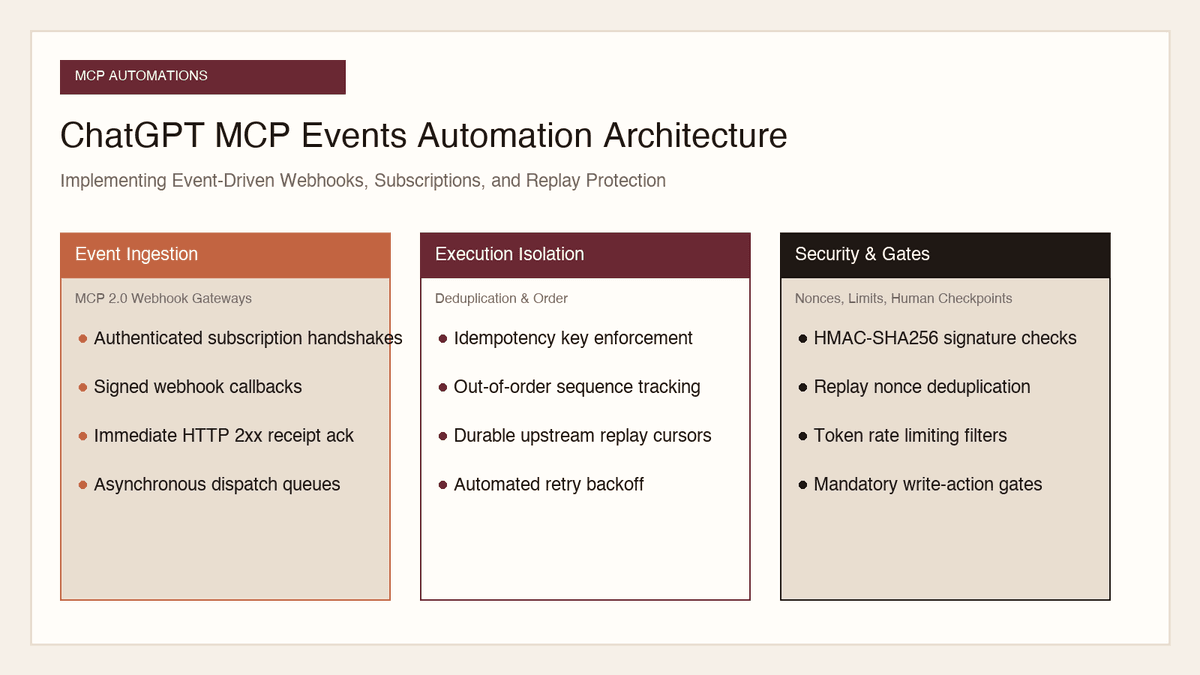
How to Implement MCP Events in ChatGPT: Event-Triggered Automations
Autonomous conversational agents no longer need to rely on wasteful polling loops. Here is how to implement event-triggered automations using ChatGPT MCP Events.
Read the article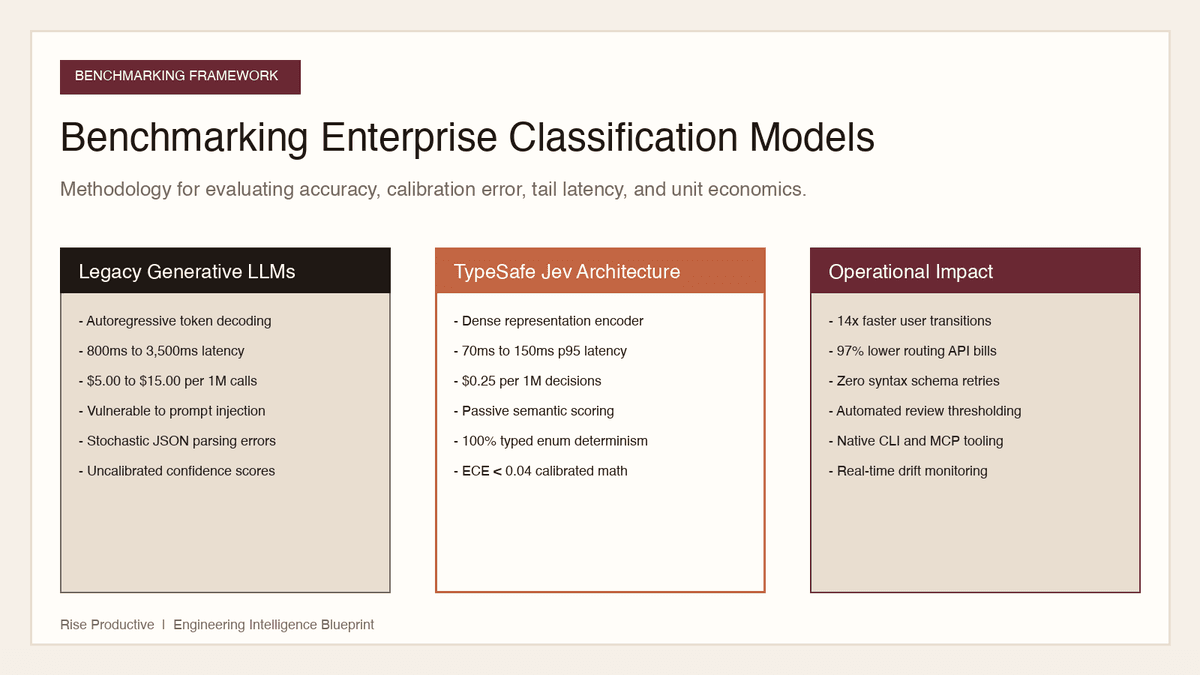
Automation and Agents
How to Benchmark Classifier Models: Latency, Cost, Determinism
Evaluating AI classifiers requires looking beyond static accuracy. Here is how to benchmark probability calibration, latency percentiles, and unit economics.
Read the article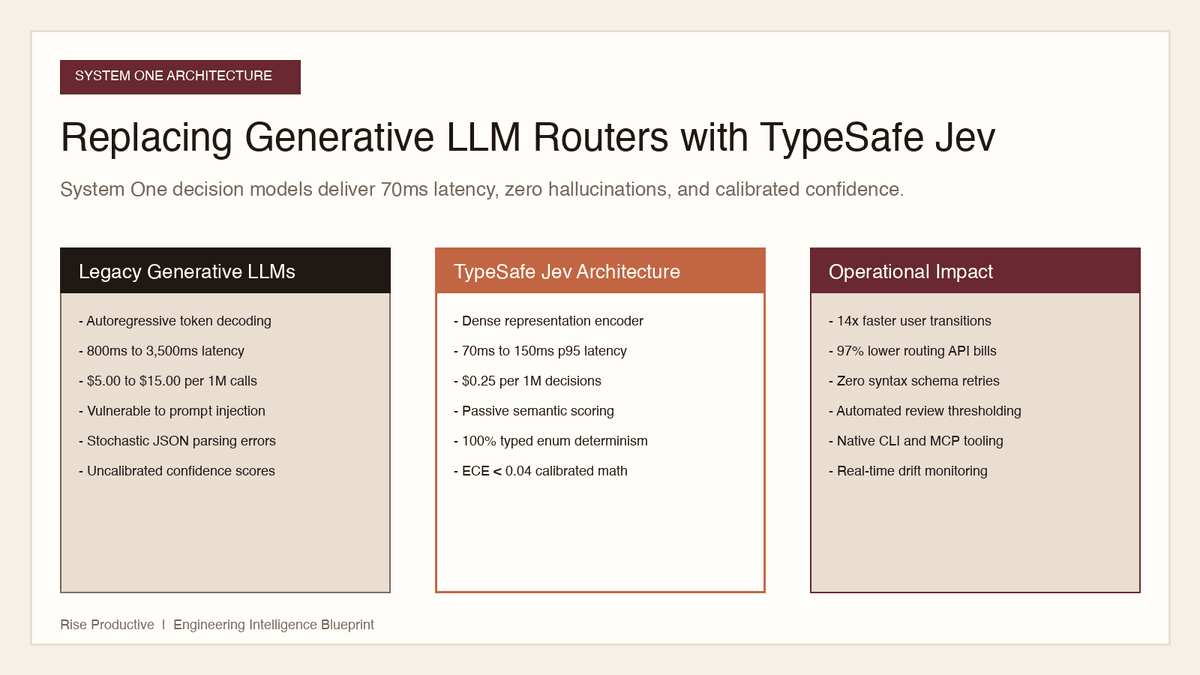
Automation and Agents
How to Replace Generative LLM Routers with TypeSafe Jev Decisions
Generative LLMs are slow, expensive, and fragile when used as routers. Here is how to replace them with TypeSafe Jev for 70ms latency and typed decisions.
Read the article