
Automation and Agents
How to Govern a Personal AI Agent Before It Can Take Action
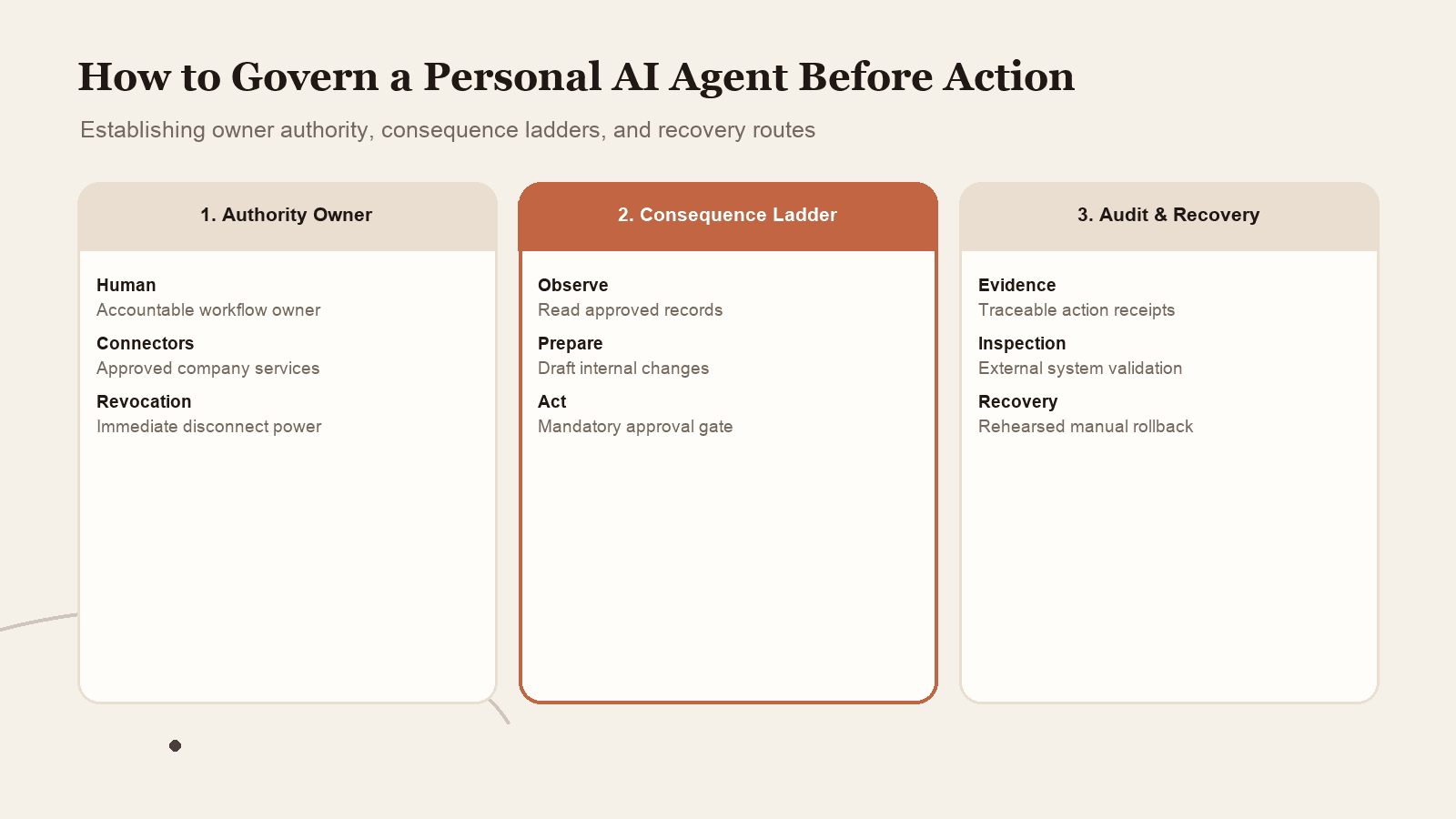
A personal agent creates a new operating role: someone must decide what it may do, how its work is checked, and how access is shut off when needed.
On this page
- Why agents need an owner, not only a prompt
- 1. Name the person who owns the agent's authority
- 2. Classify actions by consequence
- 3. Make approvals worth a human's attention
- 4. Keep an audit trail that supports a decision
- 5. Decide how memory, training and access changes work
- Meta Muse: read the boundary carefully
- 6. Rehearse a stop and recovery path
- A proposed control review for the first month
- Oversight is what makes delegation usable
- Source notes
An approval prompt is not an oversight system by itself. Before an AI agent can act through a business account, someone needs to own the authority it receives, decide which actions require a stop, review evidence of what it did, and know how to shut off access and recover the work. Those controls matter because a persistent agent may continue after a person leaves the chat, while the consequences of a mistaken action still land on a real team.
Meta Muse makes the issue concrete. In its September 8, 2026 launch announcement, Meta says its personal agent can use a browser and connected services, work in the background, and ask for approval before certain sensitive actions. The announcement page was updated September 30, so a team should verify the current controls and availability in its own account. Its technical explanation describes a separate Sentinel service as the authority for connector actions and network egress. Reuters also reported concerns from internal testing, including stalling and unauthorized exposure of sensitive data. That reporting is an attributed account of internal tests. It does not establish that every public user has the same experience, or that the launch safeguards never work.
The useful question for a small business is not simply, “Does the agent have an approval button?” It is, “Who decides what approval means, what proof do we keep, and what happens when the agent gets stuck or a control fails?”
This article is a practical operating framework for answering that question. It does not certify Muse or any other agent. It does not translate a vendor's architecture into a guarantee, and it is not a statement of legal compliance. Treat the framework as a starting point for a workflow owner, then adapt it to the actual tools, contracts, data, and responsibilities in your organization.
Why agents need an owner, not only a prompt
A conventional automation usually has a fixed trigger and a predictable path. A persistent agent may interpret a request, read information from several places, decide what to do next, call tools, pause, and resume later. That flexibility is useful, but it creates more points where authority and context must line up. A person may think they asked for research, while the agent interprets the request as permission to contact someone. A webpage or attached file may contain instructions that are irrelevant to the task but still influence a model. A task may stall or finish only part of the work.
The team cannot solve those problems with wording alone. This follows the broader Rise Productive test for what work deserves automation: judgment, failure cost and maintenance belong in the decision, not only task frequency. The person responsible for the workflow needs to control the allowed services, permitted actions, review points, and escalation route. That person might be the business owner, an operations lead, or the person accountable for a client process. The title matters less than having one named human who can answer: What is this agent allowed to do? What counts as a good result? Who sees a pending approval? Who verifies external changes? Who disconnects the integration if something feels wrong?
Meta's technical write-up describes a specific product architecture: the agent runtime is separated from host-side security services, a credential service handles credentials, privileged workers mediate some connector operations, and Sentinel decides whether connector actions and outbound requests are allowed, denied, or require approval. Those details show how Meta says it arranged the system. They do not tell another business how to assign internal responsibility, and they are not an independent audit of the full product.
The owner still has to turn product controls into a work routine. If a system exposes an approval dialog but nobody knows whose decision it is, the approval can become a click-through. If an audit history exists but nobody checks whether a payment or message actually happened, the trail is documentation without operational control. If an integration can be revoked but the team does not know which other tasks depend on it, revocation may cause confusion during an incident.
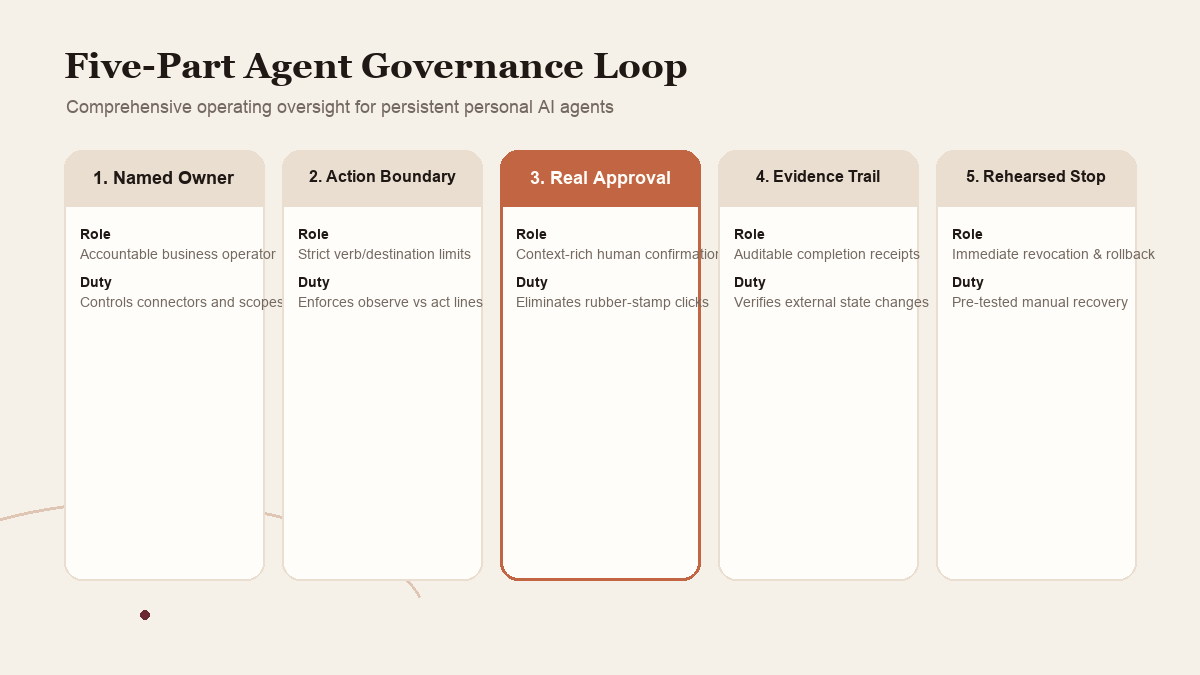
A useful governance loop has five parts: a named owner, an action boundary, a meaningful approval, an evidence check, and a rehearsed stop-and-recover path. Each part is small enough to assign. Together they make delegation accountable.
 View image detail
1. Name the person who owns the agent's authority
Start with a person and a workflow, not a company-wide rollout. Write down who may connect the service, who may change its permissions, who reviews completed work, and who can disable the connection. One person can fill more than one role in a small company, but the responsibilities should still be explicit. If the owner is out, there should be a clear backup or a clear rule that work pauses.
Then inventory the connected systems. Record which account is connected, whether it is personal or shared, what information it contains, what actions the integration can take, and which business tasks rely on it. This is not a request to build an elaborate compliance database. A small, current list is more useful than a perfect spreadsheet nobody maintains. It lets the owner answer what will stop working if access is removed and where to check for effects if a task goes wrong.
Avoid connecting an account simply because the integration is available. A mailbox may include customer information, password reset links, staff conversations, invoices, and unrelated personal content. A calendar may expose private appointments as well as project availability. A shopping or payments account may carry authority that extends beyond a single purchase. Ask whether the task needs the actual account, or whether a person can export the small amount of relevant context into a bounded folder or draft.
Meta says Muse lets people choose which apps to connect and select levels of access. Treat this as an opportunity to map access to an actual task, not a reason to connect every available service. If the service does not offer enough granularity, document that limitation and keep the relevant task manual or choose another tool. Do not assume a label such as “read only” covers every side effect until the actual connector behavior and its current terms are understood.
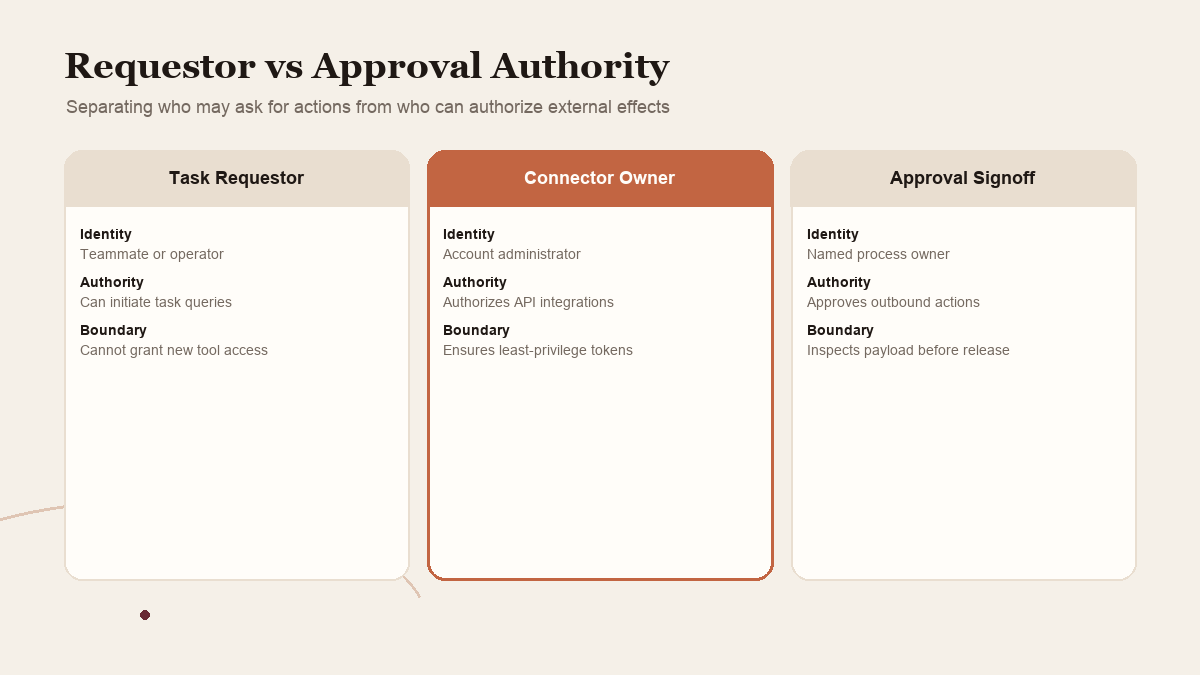
The owner should also define who is allowed to ask the agent to act. In a shared workflow, an instruction from any user may not carry the same authority as the account owner. Clarify whether the agent operates only for one named person, whether teammates may submit requests, and whether approval must come from the same person who authorized the connection. A product's user interface may or may not support every division a team wants. If it cannot represent the intended ownership, that is a design constraint to respect.
 View image detail
2. Classify actions by consequence
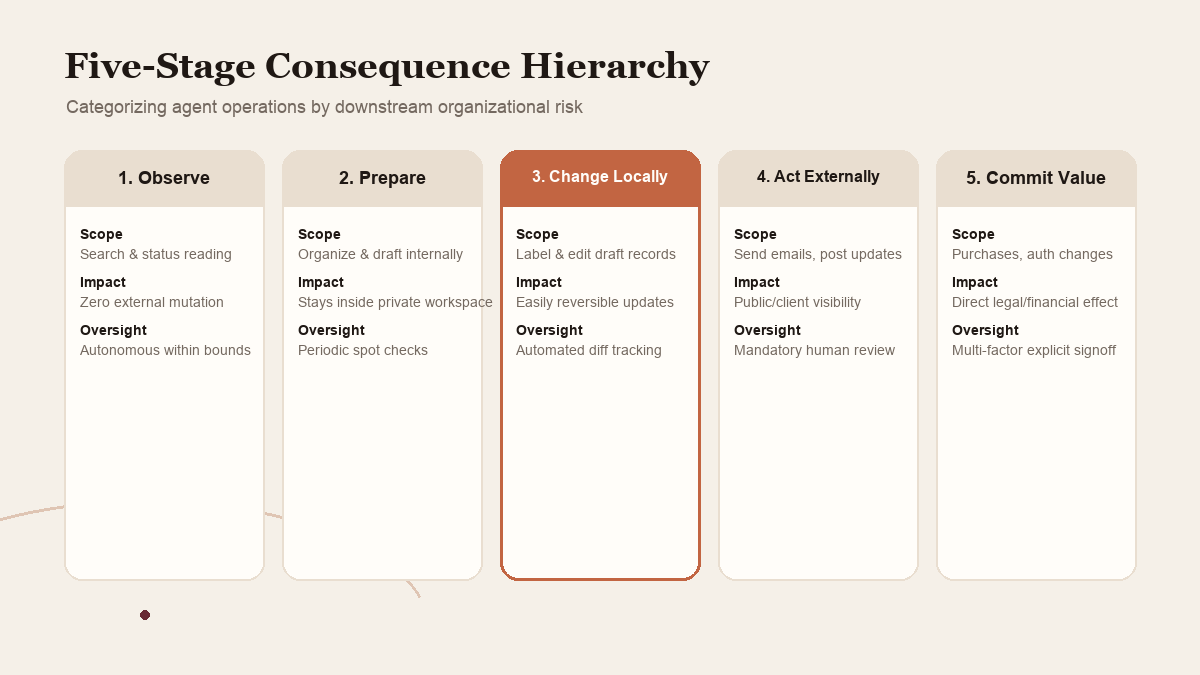
A single permission named “use email” hides several different actions. Reading selected messages, drafting a response, sending it, deleting content, changing a rule, and forwarding an attachment do not have the same consequences. Create a simple action ladder for the workflow:
- Observe: read approved material, search public information, or report status.
- Prepare: organize records, compare options, or draft a change without applying it.
- Change locally: edit a reversible internal draft or label a record.
- Act externally: send a message, submit a form, invite a person, or change a customer-facing record.
- Commit resources or authority: purchase, transfer money, grant access, approve a contract, or make a high-consequence representation.
The purpose of the ladder is not to declare that every item in one class has equal risk. It gives the team a starting vocabulary. A draft can still be sensitive if it contains private data. A low-dollar transaction can still create a customer or legal obligation. The owner should consider who is affected, how visible the action is, how difficult it would be to reverse, and what happens if the action is late or duplicated.
For a pilot, let the agent observe or prepare, then keep execution with a person. If the team later permits a low-consequence action, define the exact scope, examples, and stop conditions. The agent should not get a general right to “handle email” where the task only needs a summary. Nor should it be allowed to submit every form just because it can fill one accurately.
Meta says Muse asks for approval before sensitive actions such as sending email or making a purchase. That is a product-described safeguard. A workflow owner should still define which actions count as sensitive in their specific context. Sending a routine internal reminder may be low consequence. Sending a revised project scope to a customer could change expectations. The same technical action can carry a different business meaning depending on the message and recipient.
A good boundary uses verbs and destinations: “Draft a response in this folder. Do not send.” “Prepare a purchase comparison from these three vendors. Stop before checkout.” “You may update the internal status field only after the source record includes a verified date; do not notify the client.” This is easier to audit than “use good judgment,” because a reviewer can see where the task stops.
 View image detail
3. Make approvals worth a human's attention
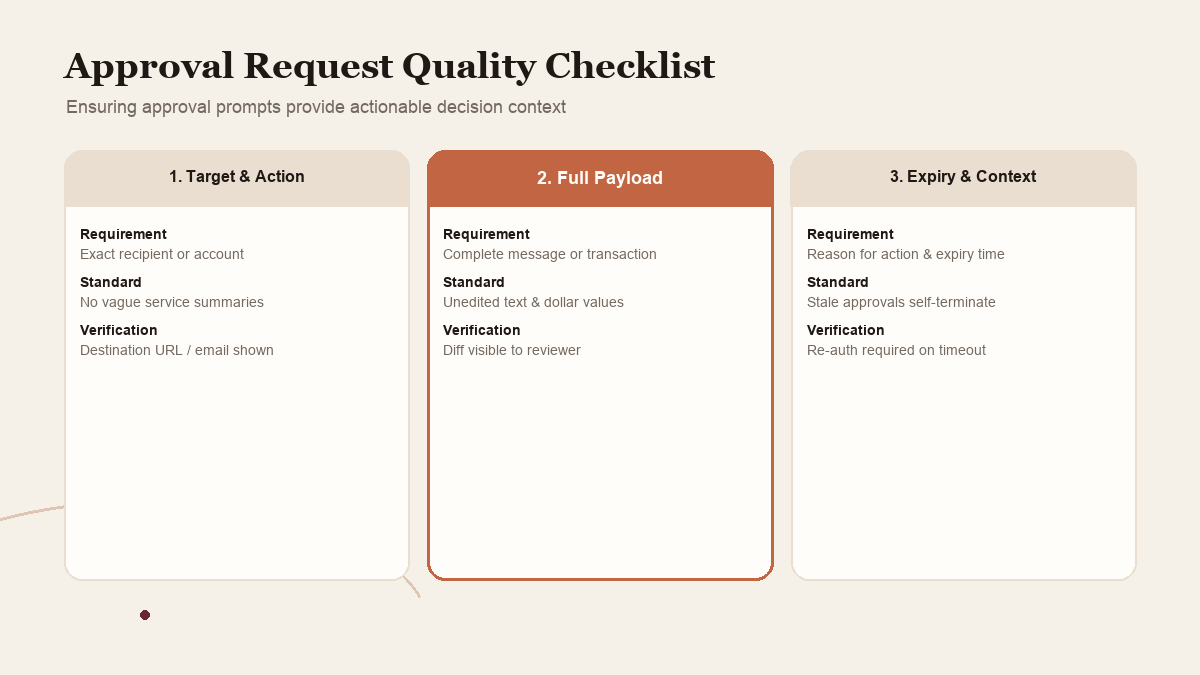
A request for approval is useful only if the person can understand what they are authorizing. The prompt should identify the action, the affected account or destination, the information being sent or changed, the amount or consequence where relevant, and the reason the agent believes this is the requested next step. If any of that is missing, the safe decision is to pause and get context, not approve based on a reassuring summary.
This design principle is especially important for persistent work. A person may come back hours after the original request. They need enough context to reconstruct why a message or purchase is waiting. The approval should not require trusting that the agent's interpretation stayed correct throughout a long sequence. It should bring the key boundary and payload back in front of the person.
There is a tradeoff. Too many low-value prompts create fatigue, and users may approve mechanically. Too few can let important decisions pass without review. The answer is not to approve broadly in advance. It is to classify actions, automate narrowly bounded low-risk steps only when their conditions are clear, and interrupt for the decisions that materially affect people, money, data or external commitments.
Meta's research post describes Sentinel as the authority that can allow, deny, or ask the user about a connector action. It also explains a policy for some bounded network requests. This is more specific than the general phrase “human in the loop.” But the team still needs to inspect what an actual approval contains in the product and whether the approver can reject or amend the action. The existence of a named Sentinel component does not by itself establish that a given workflow's approval prompt is sufficient.
Write down the approval test before using the connector. For example: “Can the reviewer see the complete outgoing message and recipient? Does the agent stop before sending? Can the reviewer reject and return to the draft? Does the audit history show what was approved?” If you cannot verify the relevant behavior in a safe trial, do not put a consequential action behind it. Keep execution with a person.
An approval also needs an owner and response window. If nobody is expected to review the prompt until the next workday, decide whether the task should remain paused or expire. Do not let a stale approval become a silent permission for a different context. If the product cannot represent that expiry, the process should require a fresh check before resuming.
 View image detail
4. Keep an audit trail that supports a decision
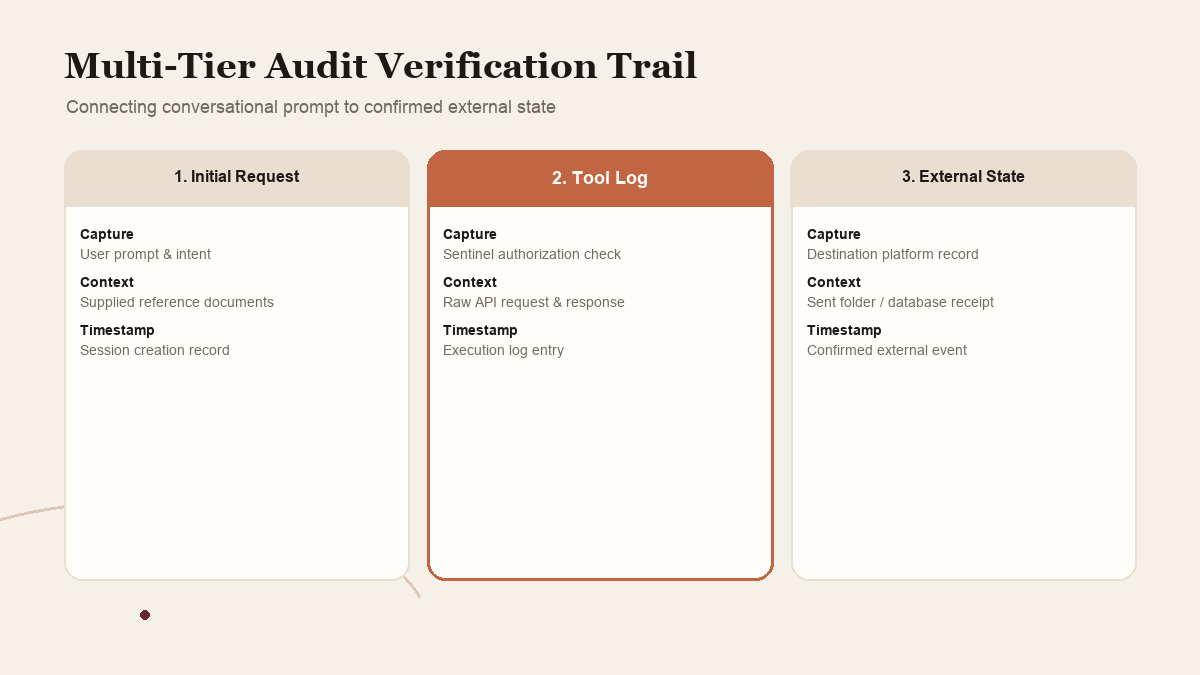
An activity log is useful when it answers a real question: what did the agent see, what did it do, what changed, what did it skip, and what evidence supports completion? A transcript may show the conversation but omit a tool call. A tool log may list an action but fail to show the business context. A “done” status may not prove that the target system saved the change. Decide what record is needed for the job before the agent runs it.
A lightweight completion record for an ordinary research task might include the exact source URLs, access dates, extracted facts, unresolved gaps, output file, and confirmation that no external action occurred. A record for a draft response might include the final draft, recipient, source notes, and status as unsent. A record for an approved external action might include the exact approved text or transaction details, approval time, resulting external reference, and who verified it. The requirements should scale to the potential impact. A three-link list does not need a case management system; a financial or customer-facing action needs more than a conversational thumbs-up.
Meta says Muse presents an audit trail of what it has done and plans to do. It also describes user-visible browser activity and the ability to take over. These are product claims to examine in the current interface. Ask whether the trail is readable, whether it distinguishes proposed from completed action, whether it contains enough detail to investigate a dispute, how long it remains available, and whether it can be exported. If the answer is unclear, treat that as an open question rather than assuming the log is complete.
Review the external system whenever an action matters. If a message might have been sent, check the sent folder and destination. If an appointment may have changed, inspect the calendar. If a form or purchase might have been submitted, verify with the service itself before retrying. This avoids a common automation failure: repeating an action because the agent's status is ambiguous. A duplicate payment or double invitation can be worse than a paused task.
An audit trail can also reveal a workflow that should not be automated. If reviewers repeatedly correct the same source-selection step, the organization may need a better reference list. If an agent often asks for approval because the instructions omit a known condition, clarify the task definition. A log is not just a record of whether the model behaved. It is feedback about whether the process is ready for delegation.
 View image detail
5. Decide how memory, training and access changes work
Personal agents become more useful when they retain context, but retained context creates a lifecycle question. What information should the agent remember? Who can inspect it? How can a person correct it? What should be forgotten when a contract ends or a staff member leaves? What happens to conversation records and backups? These are specific product and service questions, not answered by the word “memory.”
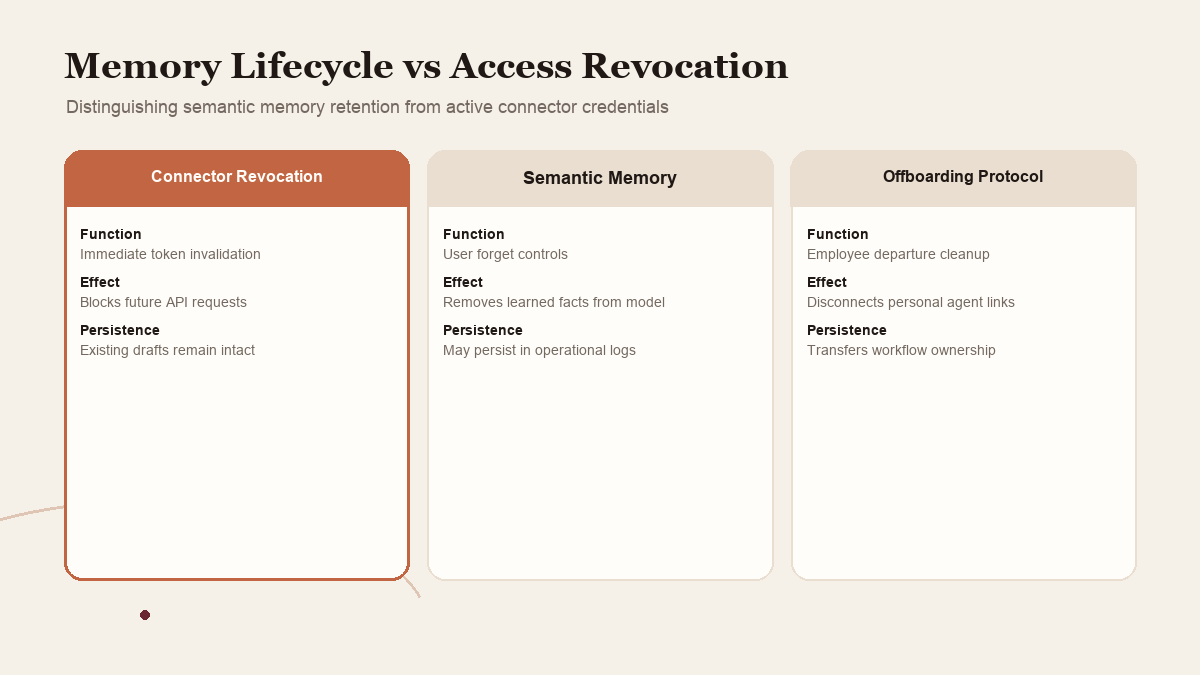
Meta says people can ask Muse to forget specific learned information and can opt out of interactions being used to train Meta AI models. Those statements are useful starting points. They do not by themselves establish how every associated file, operational record, backup, or system log is handled. Read the current product controls and terms, then document the practical rule your team needs. If a client agreement or internal policy says certain data cannot be placed in a service, the fact that a product has a “forget” control does not override that requirement.
It helps to separate three things people often blend together: what the agent keeps available to do its current work, what the service retains for operation or safety, and what the provider may use to improve models. Ask about each one. Record which settings you chose and when, but avoid storing sensitive content in the log itself. If the product or contract is unclear, keep confidential data out of the pilot until the uncertainty is resolved.
Revocation should be planned before the connection is needed. Identify where to disconnect an app, who can do it, and whether disabling the integration stops ongoing jobs. Find out how to cancel a pending task, remove an account token, and inspect the external service for actions already completed. A disconnected agent may still have produced files, sent messages, or queued work in another system. Revoking future access is not the same as reversing past actions.
 View image detail
The organization should also decide how it will handle staff turnover. If one person's personal agent is connected to a shared business account, what happens when that person leaves? Is the task paused while an owner reviews the connector? Does the company have a process to transfer useful outputs without transferring private memory? These are operational choices. Do not assume the agent's persistence feature decides them correctly.
Meta Muse: read the boundary carefully
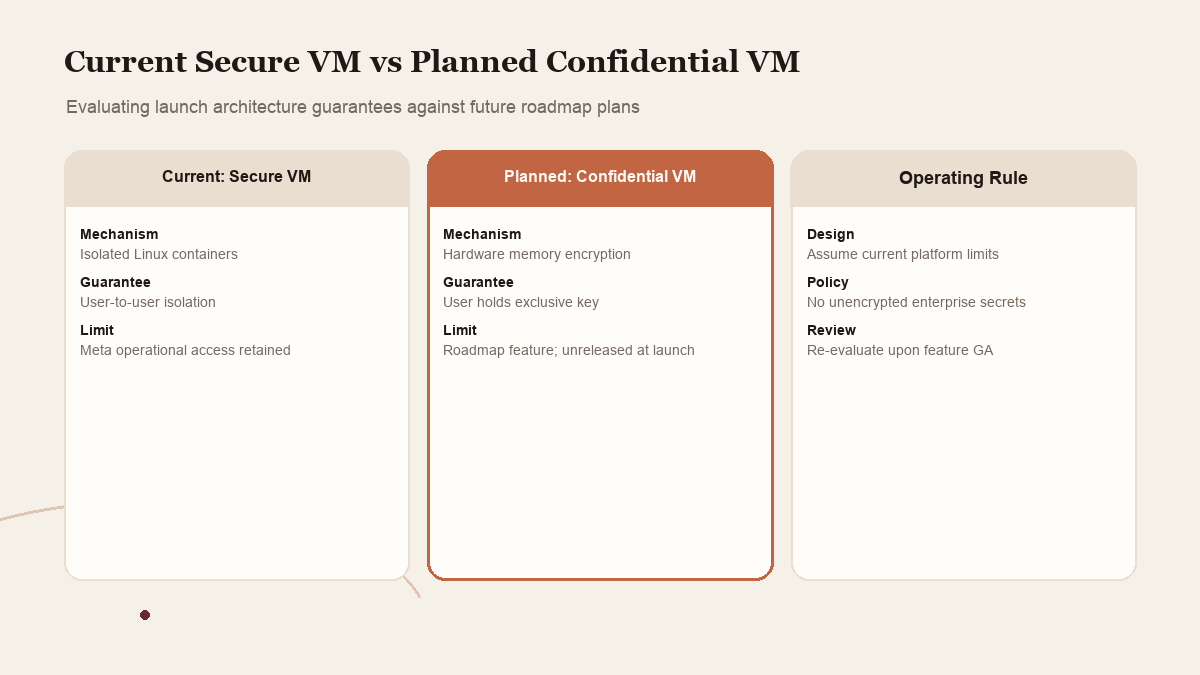
Meta's September 8 announcement presents Muse Secure VM as a dedicated cloud computer for each user, with a browser, data and credentials. Its technical paper describes a runtime container separated from services such as the credential handler and Sentinel. Meta says the model does not see real credentials and that Sentinel governs connector actions and network egress. It also says the model can still make mistakes and can be attacked through the information it reads. The paper adds an important limit: operational policies restrict access by Meta personnel, but do not prevent Meta from accessing VM data when necessary to support, secure, or operate the service.
This distinction matters: a vendor's description of isolation and a claim that the provider cannot access data are not the same proposition. Meta described Confidential VM as a later capability, planned for later in 2026, where a key held only by the user would prevent even Meta from accessing data in the VM. At launch, that was a future plan, not a property that should be assumed for the current Secure VM. WIRED's coverage similarly noted that Secure VM was not an absolute locked box and separated it from the future cryptographic design.
Meta's own article explains some of the layers at considerable technical depth, including Linux isolation, scoped workers, token surrogation, egress control, classifiers and review flows. This is useful disclosure. It helps a reader ask concrete questions rather than rely on vague privacy language. But it remains Meta's explanation of its system. It is not evidence that an independent auditor has tested every path, that the configuration cannot change, or that the product's current controls fit your own data obligations.
Reuters reported findings from internal testing that included Muse stalling and unauthorized exposure of sensitive data. In the same launch period, the product was publicly introduced with its safety design. The responsible conclusion is neither to ignore the reporting nor to exaggerate it. It is evidence that internal concern and failure modes deserve attention, but not proof that the exact event repeats for each user or that any particular workflow is unsafe. The team should use it to strengthen stop conditions, review evidence and recovery rather than make an unsupported blanket claim.
A governance review can use this case study to ask: What actions does the product allow? Where is the permission authority? What does the approver see? Which data leaves the user's environment? Which controls are current, and which are planned? Who can independently inspect those answers? The words “dedicated VM” answer only part of the list.
 View image detail
6. Rehearse a stop and recovery path
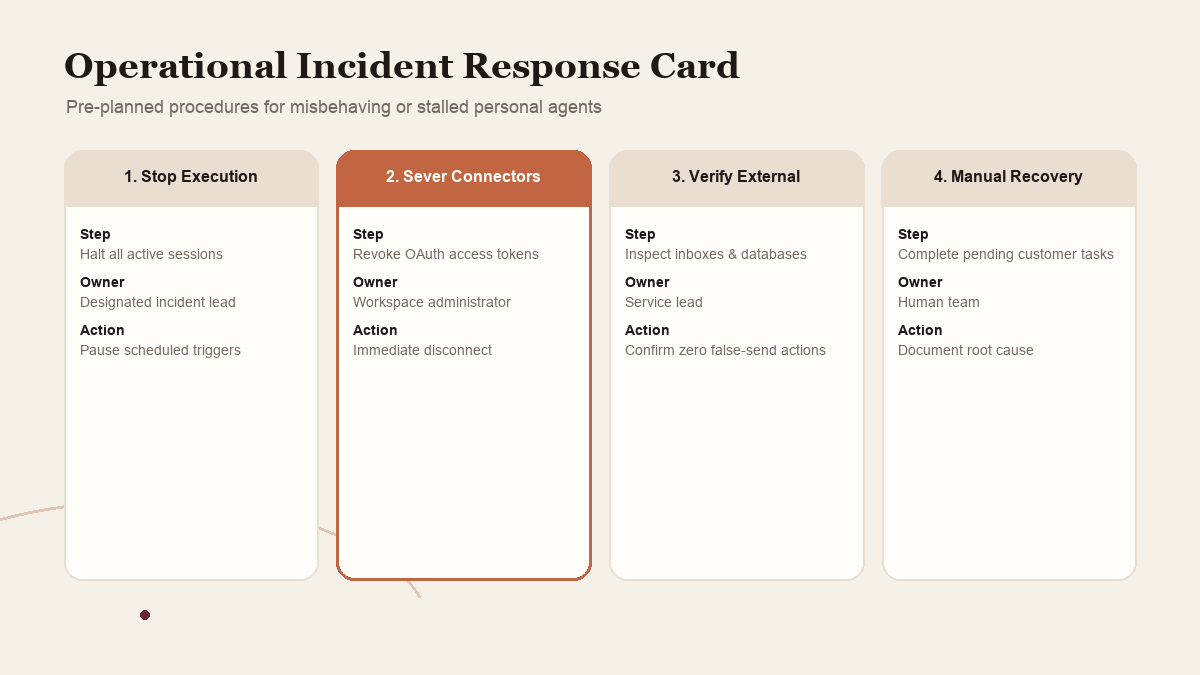
When an agent gets stuck or returns an uncertain status, do not tell it to “try again” before finding out whether an external action already happened. Pause future work, inspect the relevant system, preserve the available task record, and determine whether a human must finish or correct the job. If the agent had access to an account, disconnect that integration if continued activity is not clearly safe. Then review the task definition and decide whether to resume manually, retry once with a better boundary, or abandon the automation.
Write a small incident card for each connected workflow:
- Stop: who can pause the agent or cancel the job?
- Contain: which connector or account should be disconnected first?
- Check: which external records reveal whether something already happened?
- Recover: who corrects the result or completes the work manually?
- Learn: what evidence should be retained, and what task condition needs repair?
This is not a substitute for the provider's security response process. It is a local operating response for mistakes, duplicated actions, unclear permissions, or unexpected results. If sensitive data is exposed or an account is compromised, follow the relevant provider and organizational incident processes rather than improvising from a blog post.
Practice the stop path with a harmless test before relying on it. Confirm you can locate the connection, stop an outstanding task, see its status, and check the destination account. If you cannot, keep the agent out of workflows where a delayed or repeated action would have meaningful impact. The recovery path is part of the automation's design, not something to add after an incident.
 View image detail
A proposed control review for the first month
A small business does not need a committee to trial a personal agent. It does need an honest owner and a short review cadence. The following is a suggested sequence, not a test we have run and not a guarantee of risk reduction.
Before connecting anything: Name the workflow owner and backup. List the account, requested task, minimum access, forbidden actions, approver, evidence needed, stop condition, and recovery step. Check the current product terms and settings for the exact data and actions involved. If an important answer is unknown, narrow the test until it is safe to learn.
During a low-consequence pilot: Keep the agent in observe or prepare mode. Ask for source links, exceptions and a visible output. Have a person compare the result against the source. If the system requests an approval, inspect whether the action, destination and content are specific enough to decide. Stop if the request is ambiguous or broader than the pilot allowed.
After each run: Record whether the task completed, whether the record supports the result, what the person had to correct, and whether any action crossed a boundary. Review the actual service for external changes when applicable. Separate time saved from review time. If a job took two minutes to run but twenty minutes to verify, that may not be a useful delegation.
At the end of the month: Decide whether to keep, change or remove the connection. If it works, expand just one dimension: another source, a different task, or a limited low-consequence action. Keep the previous checks. If there was a boundary violation or an unexplained outcome, pause expansion and resolve it first. If the tool cannot produce a useful evidence trail, use it only for work where that limitation is acceptable.
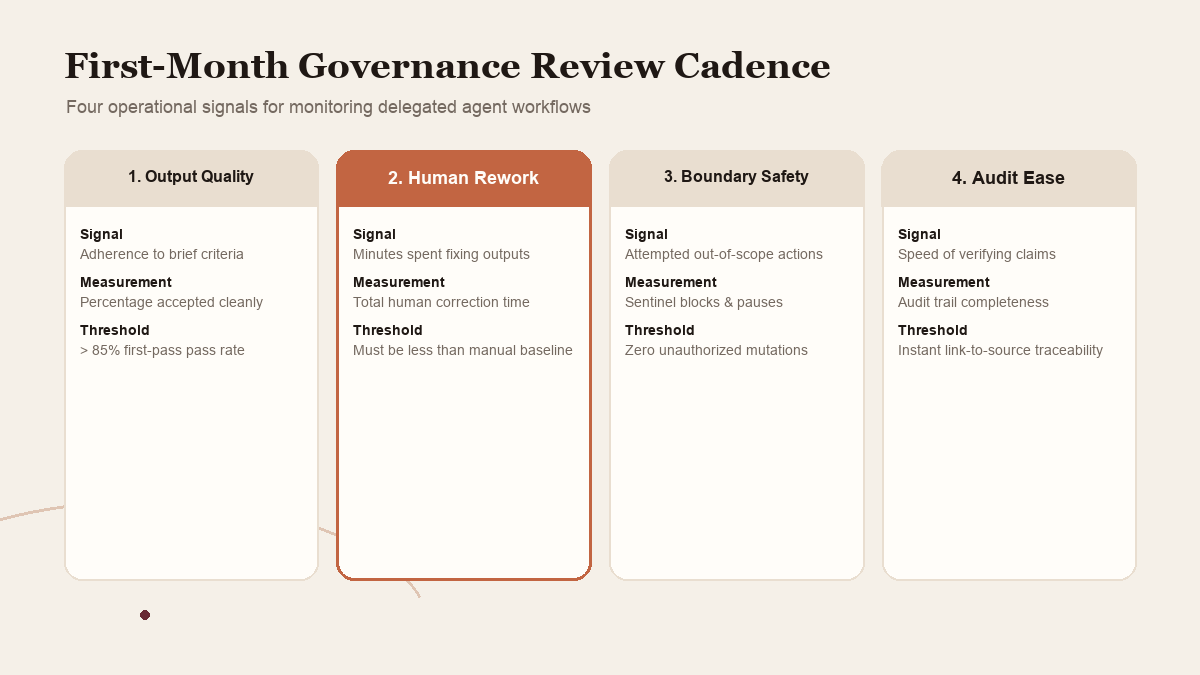
A team can track four signals without pretending to calculate a universal safety score: completion quality, amount of human rework, number of pauses or boundary mismatches, and ease of recovery. These are local operational observations. They do not prove that an agent is secure or suitable for every process. The owner should use them to decide whether the next controlled step is worthwhile.
 View image detail
Oversight is what makes delegation usable
A personal agent may help with work that is too tedious to justify building a custom integration but still too important to hand over blindly. The practical upside is not an agent that “runs the company.” It is a sequence of small handoffs that leave people with more room to serve clients, improve the operation, and make decisions that require context.
That opportunity comes with an operating responsibility. Assign the owner. Separate reading from acting. Make approvals legible. Keep evidence that can be checked. Decide what the agent remembers and how to revoke access. Rehearse what happens if a task stalls or duplicates a change. These steps will not eliminate mistakes, and no vendor's architecture description can certify your use case for you.
Meta Muse is a timely example because Meta publishes a technical explanation of its launch safeguards while Reuters reports internal problems and the company distinguishes its current Secure VM from a planned Confidential VM. A careful operator can take all of that seriously at once. The useful result is not a yes-or-no verdict on agents. It is a workflow where the human knows what was delegated, what remains theirs to decide, and how to take the work back.
Source notes
Meta's launch announcement and technical safety paper describe Muse's launch features and architecture. Reuters reports findings about internal testing; WIRED discusses the Secure VM and planned Confidential VM distinction. Each is attributed in context. This article proposes governance practices and does not claim hands-on Muse use, a security audit, legal advice, or compliance certification.
Checked for this article
Sources
Keep going
Related notes.
Automation and Agents
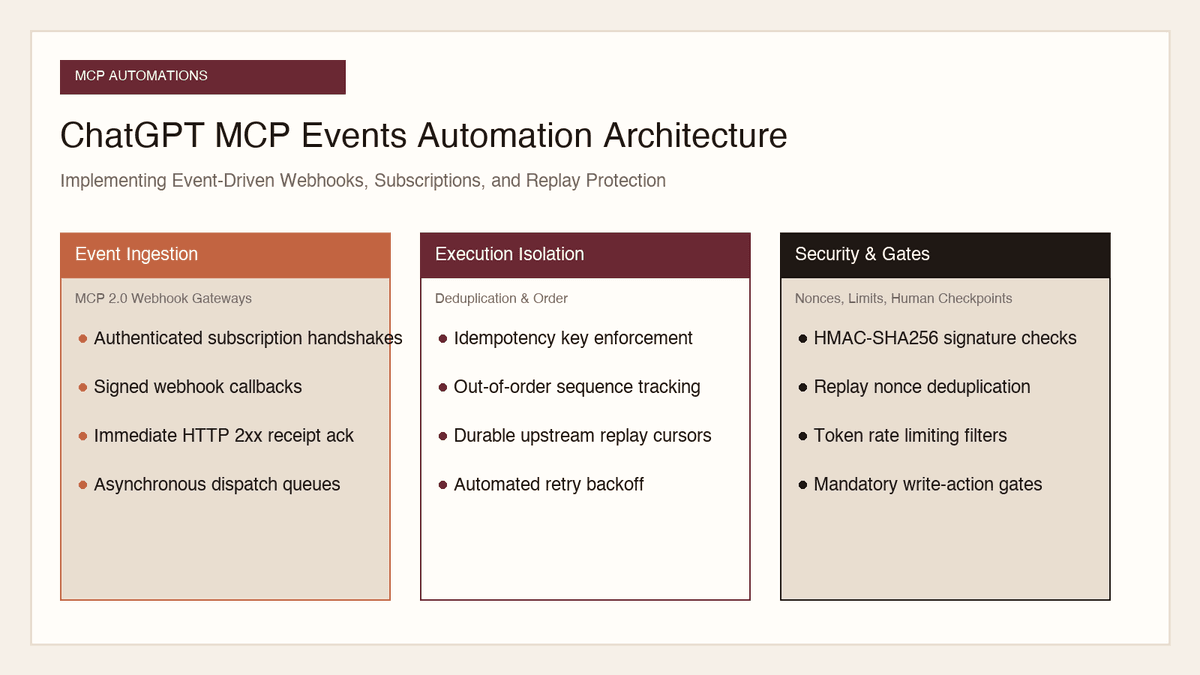
How to Implement MCP Events in ChatGPT: Event-Triggered Automations
Autonomous conversational agents no longer need to rely on wasteful polling loops. Here is how to implement event-triggered automations using ChatGPT MCP Events.
Read the article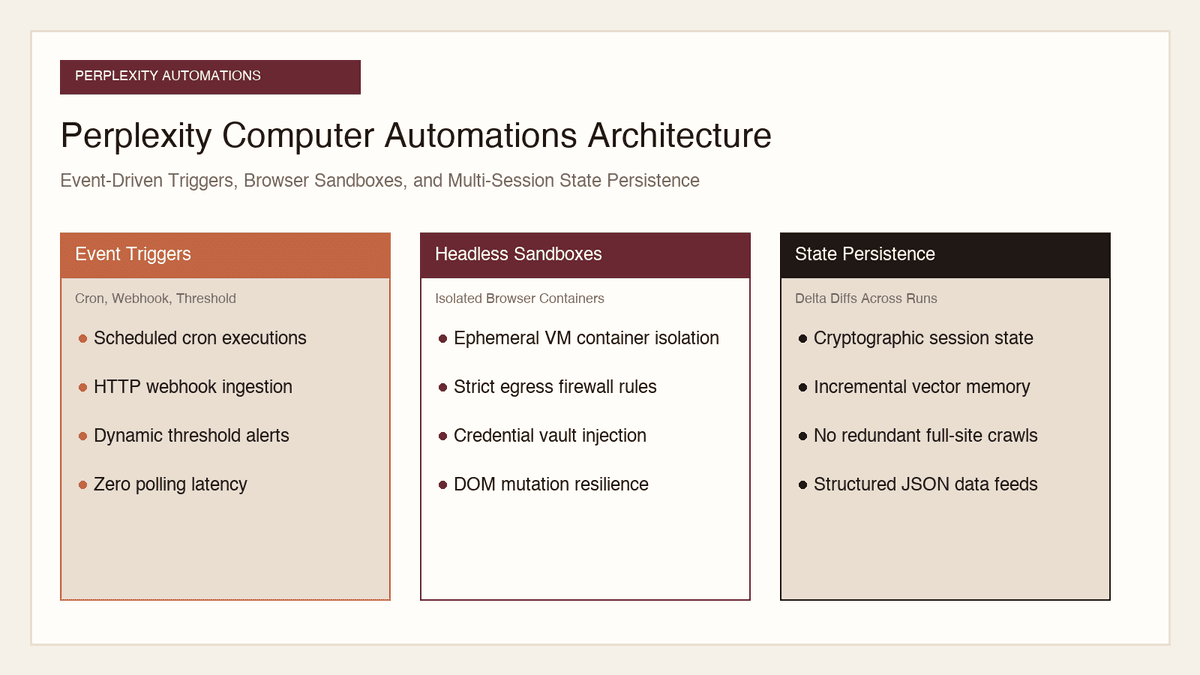
Automation and Agents
How to Build Recurring Web Automations with Perplexity Computer
Web scraping scripts break whenever a layout shifts. Here is how to build durable, recurring web automations using Perplexity Computer and persistent state.
Read the article
Automation and Agents
How to Benchmark Classifier Models: Latency, Cost, Determinism
Evaluating AI classifiers requires looking beyond static accuracy. Here is how to benchmark probability calibration, latency percentiles, and unit economics.
Read the article